Chapter # 05
Discriminant Analysis

1 Introduction

2 Assumptions of Linear Discriminant Analysis

Discriminant analysis assumes that:

  1. The data is normally distributed.

  2. Means of each class are specific to that class.

  3. All classes have a common covariance matrix.

If these assumptions are realized, DA generates a linear decision boundary.

3 Loading Python Packages

import pandas as pd
import numpy as np
import matplotlib.pyplot as plt 
import seaborn as sns
# For Visualization
sns.set(style = "white")
sns.set(style = "whitegrid", color_codes = True)

import sklearn # For Machine Learning 

import warnings 
warnings.filterwarnings('ignore')

import sys
sys.version

print ('The Python version that is used for this code file is {}'.format(sys.version))
print ('The Scikit-learn version that is used for this code file is {}'.format(sklearn.__version__))
print ('The Panda version that is used for this code file is {}'.format(pd.__version__))
print ('The Numpy version that is used for this code file is {}'.format(np.__version__))
The Python version that is used for this code file is 3.13.1 (tags/v3.13.1:0671451, Dec  3 2024, 19:06:28) [MSC v.1942 64 bit (AMD64)]
The Scikit-learn version that is used for this code file is 1.6.0
The Panda version that is used for this code file is 2.2.3
The Numpy version that is used for this code file is 2.2.1

4 Working Directory

import os
os.getcwd()
for x in os.listdir():
  print (x)

5 Importing Datasets

from sklearn import datasets
dataset = datasets.load_wine()

6 Metadata of the Imported Dataset

dataset.keys()
dict_keys(['data', 'target', 'frame', 'target_names', 'DESCR', 'feature_names'])
dataset['data']
array([[1.423e+01, 1.710e+00, 2.430e+00, ..., 1.040e+00, 3.920e+00,
        1.065e+03],
       [1.320e+01, 1.780e+00, 2.140e+00, ..., 1.050e+00, 3.400e+00,
        1.050e+03],
       [1.316e+01, 2.360e+00, 2.670e+00, ..., 1.030e+00, 3.170e+00,
        1.185e+03],
       ...,
       [1.327e+01, 4.280e+00, 2.260e+00, ..., 5.900e-01, 1.560e+00,
        8.350e+02],
       [1.317e+01, 2.590e+00, 2.370e+00, ..., 6.000e-01, 1.620e+00,
        8.400e+02],
       [1.413e+01, 4.100e+00, 2.740e+00, ..., 6.100e-01, 1.600e+00,
        5.600e+02]], shape=(178, 13))
dataset['target']
array([0, 0, 0, 0, 0, 0, 0, 0, 0, 0, 0, 0, 0, 0, 0, 0, 0, 0, 0, 0, 0, 0,
       0, 0, 0, 0, 0, 0, 0, 0, 0, 0, 0, 0, 0, 0, 0, 0, 0, 0, 0, 0, 0, 0,
       0, 0, 0, 0, 0, 0, 0, 0, 0, 0, 0, 0, 0, 0, 0, 1, 1, 1, 1, 1, 1, 1,
       1, 1, 1, 1, 1, 1, 1, 1, 1, 1, 1, 1, 1, 1, 1, 1, 1, 1, 1, 1, 1, 1,
       1, 1, 1, 1, 1, 1, 1, 1, 1, 1, 1, 1, 1, 1, 1, 1, 1, 1, 1, 1, 1, 1,
       1, 1, 1, 1, 1, 1, 1, 1, 1, 1, 1, 1, 1, 1, 1, 1, 1, 1, 1, 1, 2, 2,
       2, 2, 2, 2, 2, 2, 2, 2, 2, 2, 2, 2, 2, 2, 2, 2, 2, 2, 2, 2, 2, 2,
       2, 2, 2, 2, 2, 2, 2, 2, 2, 2, 2, 2, 2, 2, 2, 2, 2, 2, 2, 2, 2, 2,
       2, 2])
dataset['target_names']
array(['class_0', 'class_1', 'class_2'], dtype='<U7')
# Creating Data frame from the array 
data = pd.DataFrame(dataset['data'], columns = dataset['feature_names'])
data.head()
alcohol malic_acid ash alcalinity_of_ash magnesium total_phenols flavanoids nonflavanoid_phenols proanthocyanins color_intensity hue od280/od315_of_diluted_wines proline
0 14.23 1.71 2.43 15.6 127.0 2.80 3.06 0.28 2.29 5.64 1.04 3.92 1065.0
1 13.20 1.78 2.14 11.2 100.0 2.65 2.76 0.26 1.28 4.38 1.05 3.40 1050.0
2 13.16 2.36 2.67 18.6 101.0 2.80 3.24 0.30 2.81 5.68 1.03 3.17 1185.0
3 14.37 1.95 2.50 16.8 113.0 3.85 3.49 0.24 2.18 7.80 0.86 3.45 1480.0
4 13.24 2.59 2.87 21.0 118.0 2.80 2.69 0.39 1.82 4.32 1.04 2.93 735.0
# Feature Vector 
features_df = pd.DataFrame(dataset.data, columns = dataset.feature_names)
# Target Vector 
target_df = pd.Categorical.from_codes(dataset.target, dataset.target_names)
target_df
['class_0', 'class_0', 'class_0', 'class_0', 'class_0', ..., 'class_2', 'class_2', 'class_2', 'class_2', 'class_2']
Length: 178
Categories (3, object): ['class_0', 'class_1', 'class_2']
# Joining the above two datasets 
df = features_df.join(pd.Series(target_df, name = 'class'))
df.head()
alcohol malic_acid ash alcalinity_of_ash magnesium total_phenols flavanoids nonflavanoid_phenols proanthocyanins color_intensity hue od280/od315_of_diluted_wines proline class
0 14.23 1.71 2.43 15.6 127.0 2.80 3.06 0.28 2.29 5.64 1.04 3.92 1065.0 class_0
1 13.20 1.78 2.14 11.2 100.0 2.65 2.76 0.26 1.28 4.38 1.05 3.40 1050.0 class_0
2 13.16 2.36 2.67 18.6 101.0 2.80 3.24 0.30 2.81 5.68 1.03 3.17 1185.0 class_0
3 14.37 1.95 2.50 16.8 113.0 3.85 3.49 0.24 2.18 7.80 0.86 3.45 1480.0 class_0
4 13.24 2.59 2.87 21.0 118.0 2.80 2.69 0.39 1.82 4.32 1.04 2.93 735.0 class_0
df.info()
<class 'pandas.core.frame.DataFrame'>
RangeIndex: 178 entries, 0 to 177
Data columns (total 14 columns):
 #   Column                        Non-Null Count  Dtype   
---  ------                        --------------  -----   
 0   alcohol                       178 non-null    float64 
 1   malic_acid                    178 non-null    float64 
 2   ash                           178 non-null    float64 
 3   alcalinity_of_ash             178 non-null    float64 
 4   magnesium                     178 non-null    float64 
 5   total_phenols                 178 non-null    float64 
 6   flavanoids                    178 non-null    float64 
 7   nonflavanoid_phenols          178 non-null    float64 
 8   proanthocyanins               178 non-null    float64 
 9   color_intensity               178 non-null    float64 
 10  hue                           178 non-null    float64 
 11  od280/od315_of_diluted_wines  178 non-null    float64 
 12  proline                       178 non-null    float64 
 13  class                         178 non-null    category
dtypes: category(1), float64(13)
memory usage: 18.5 KB
df.columns
num_features= dataset.feature_names
num_features
# Looping functions 
df.groupby('class')[num_features].mean().transpose()
class class_0 class_1 class_2
alcohol 13.744746 12.278732 13.153750
malic_acid 2.010678 1.932676 3.333750
ash 2.455593 2.244789 2.437083
alcalinity_of_ash 17.037288 20.238028 21.416667
magnesium 106.338983 94.549296 99.312500
total_phenols 2.840169 2.258873 1.678750
flavanoids 2.982373 2.080845 0.781458
nonflavanoid_phenols 0.290000 0.363662 0.447500
proanthocyanins 1.899322 1.630282 1.153542
color_intensity 5.528305 3.086620 7.396250
hue 1.062034 1.056282 0.682708
od280/od315_of_diluted_wines 3.157797 2.785352 1.683542
proline 1115.711864 519.507042 629.895833

7 Analysis of Variance (ANOVA)

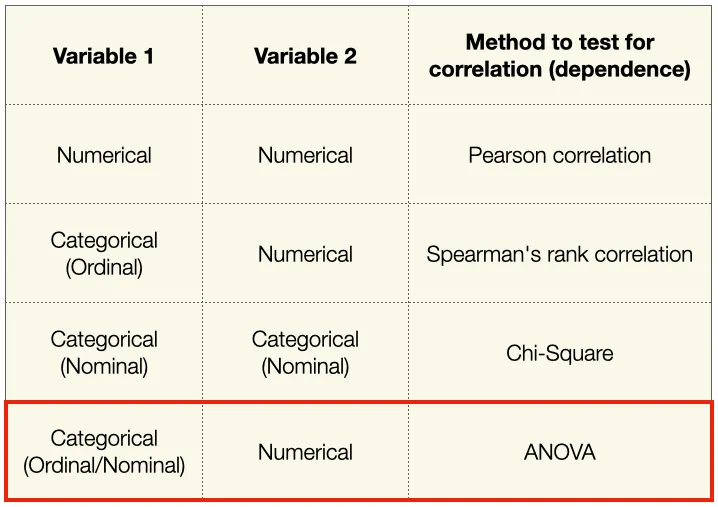
One-way ANOVA (also known as “Analysis of Variance”) is a test that is used to find out whether there exists a statistically significant difference between the mean values of more than one group.

See Figure 1 to know when you should use which correlation

Figure 1: When You Should Use Which Correlation?

A one-way ANOVA has the below given null and alternative hypotheses:

H0 (Null hypothesis): μ1 = μ2 = μ3 = … = μk (It implies that the means of all the population are equal)

H1 (Alternate hypothesis): It states that there will be at least one population mean that differs from the rest

dataset.target_names
alc_class0 = df[df['class']=='class_0']['alcohol']
type(alc_class0)
alc_class1 = df[df['class']=='class_1']['alcohol']
alc_class2 = df[df['class']=='class_2']['alcohol']


from scipy.stats import f_oneway
f_oneway(alc_class0,alc_class1,alc_class2)
F_onewayResult(statistic=np.float64(135.07762424279912), pvalue=np.float64(3.319503795619639e-36))

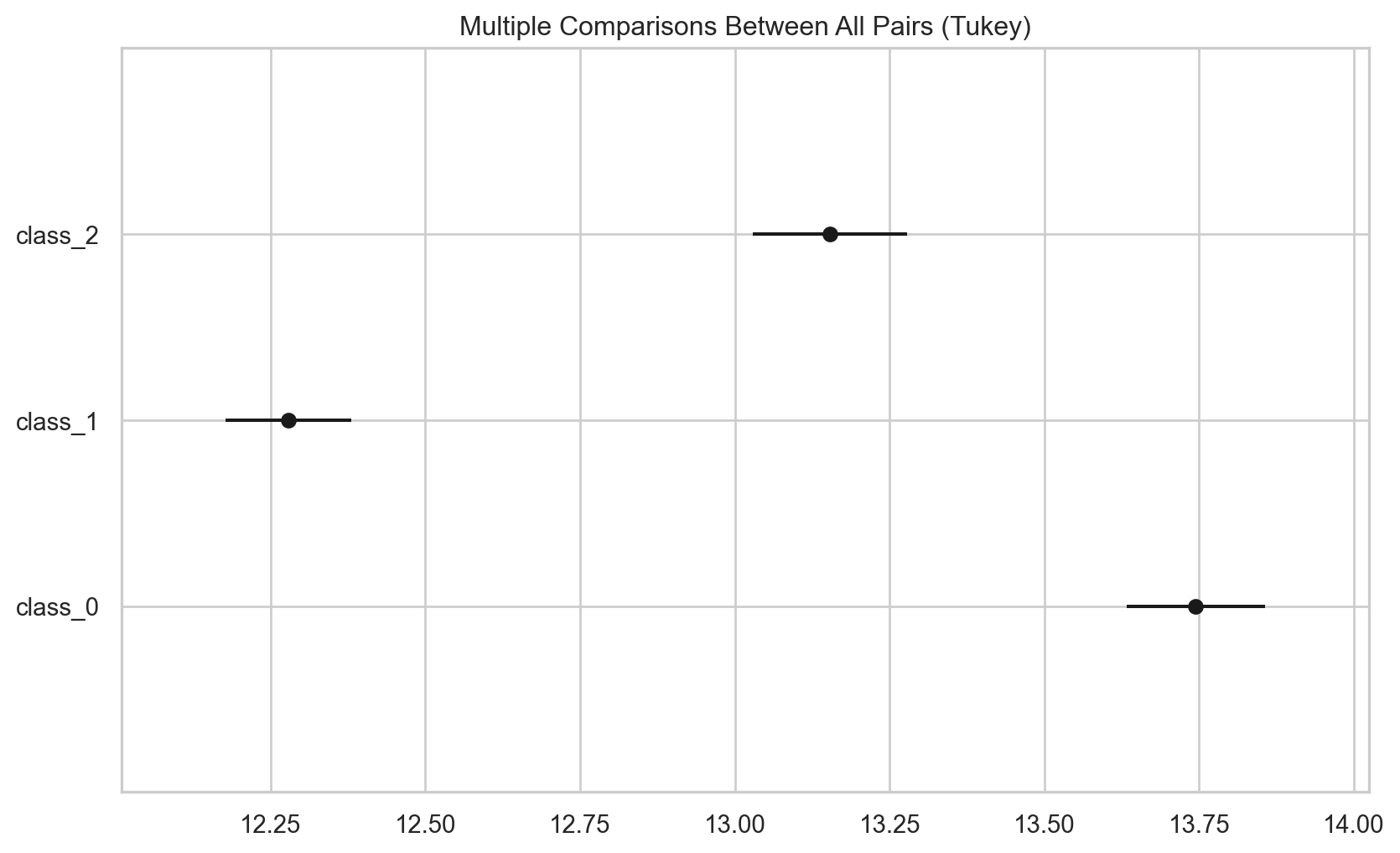
The F statistic is 135.0776 and p-value is 0.000. Since the p-value is less than 0.05, we reject Null Hypothesis (H0). The findings imply that there exists a difference between three groups for the variable alcohol.

So, where does the difference come from? We can perform Post Hoc Analysis to check where does the differences come from

import statsmodels.api as sm
from statsmodels.stats.multicomp import pairwise_tukeyhsd
tukey = pairwise_tukeyhsd(endog=df['alcohol'],     # Data
                          groups=df['class'],   # Groups
                          alpha=0.05)
tukey.summary()
Multiple Comparison of Means - Tukey HSD, FWER=0.05
group1 group2 meandiff p-adj lower upper reject
class_0 class_1 -1.466 0.0 -1.6792 -1.2528 True
class_0 class_2 -0.591 0.0 -0.8262 -0.3558 True
class_1 class_2 0.875 0.0 0.6489 1.1011 True

See Figure 2 for the sources of differences of target variable and alcohol

tukey.plot_simultaneous()    # Plot group confidence intervals
plt.vlines(x=49.57,ymin=-0.5,ymax=4.5, color="red")
plt.show()
Figure 2: Where Does the Difference Come From between Target variable and variable alcohol?

7.1 Using ANOVA for Feature Selection

list(dataset.target_names)
[np.str_('class_0'), np.str_('class_1'), np.str_('class_2')]
tukey_malic = pairwise_tukeyhsd(endog=df['malic_acid'],     # Data
                          groups=df['class'],   # Groups
                          alpha=0.05)
tukey_malic.summary()
Multiple Comparison of Means - Tukey HSD, FWER=0.05
group1 group2 meandiff p-adj lower upper reject
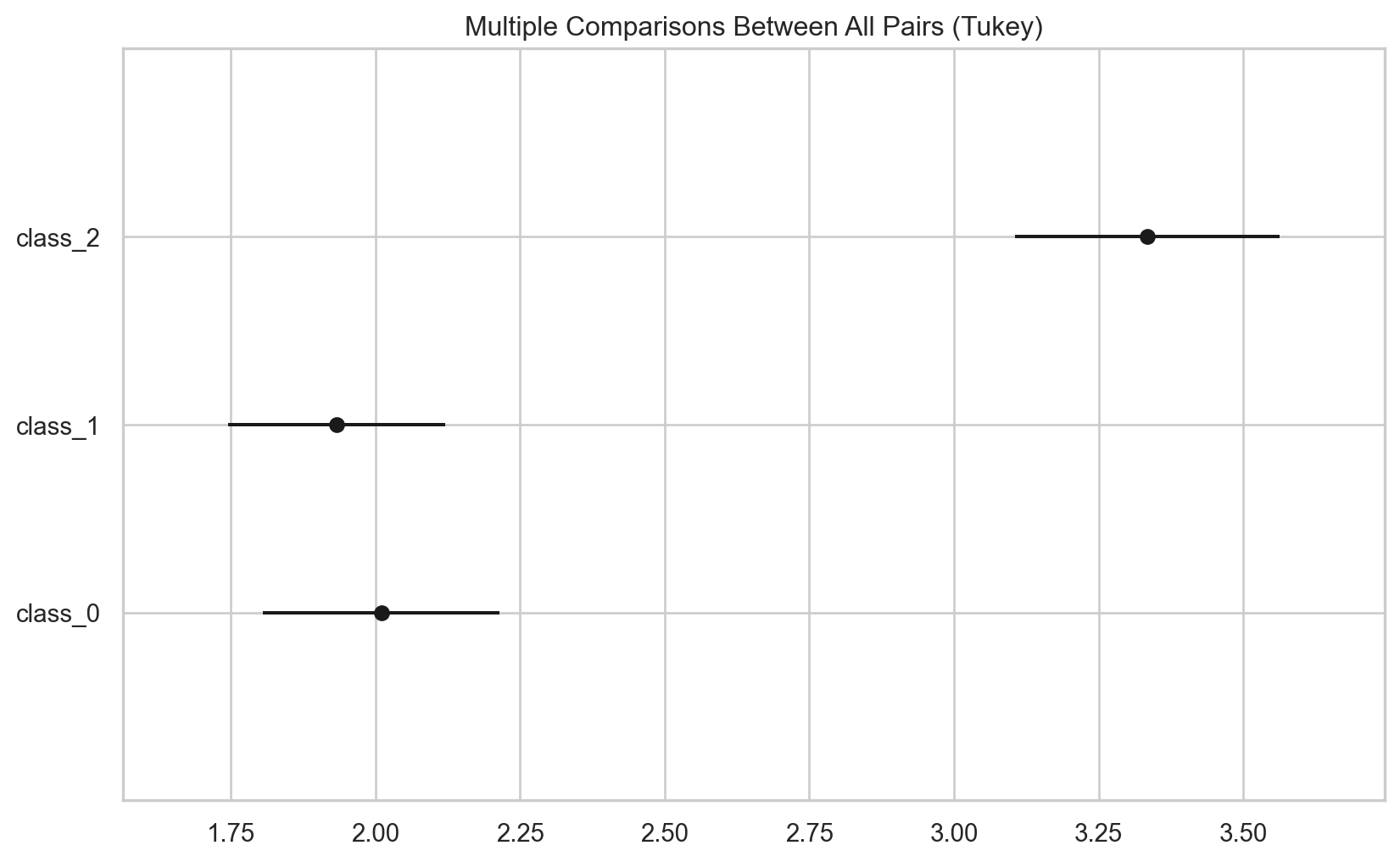
class_0 class_1 -0.078 0.8855 -0.4703 0.3143 False
class_0 class_2 1.3231 0.0 0.8902 1.7559 True
class_1 class_2 1.4011 0.0 0.9849 1.8172 True

See Figure 3 for the difference between target variable and malic_acid

tukey_malic.plot_simultaneous()    # Plot group confidence intervals
plt.vlines(x=49.57,ymin=-0.5,ymax=4.5, color="red")
plt.show()
Figure 3: Where Does the Difference Come From between Target variable and variable malic_acid?
import statsmodels.api as sm
from statsmodels.formula.api import ols
df.rename(columns = {
  'od280/od315_of_diluted_wines': 'diluted_wines'}, inplace = True)

8 Linear Discriminant Analysis

X = dataset.data
y = dataset.target
target_names = dataset.target_names
from sklearn.discriminant_analysis import LinearDiscriminantAnalysis
lda = LinearDiscriminantAnalysis(n_components = 2)
X_r2 = lda.fit(X,y).transform(X)
X_r2[0:10,]
array([[-4.70024401,  1.97913835],
       [-4.30195811,  1.17041286],
       [-3.42071952,  1.42910139],
       [-4.20575366,  4.00287148],
       [-1.50998168,  0.4512239 ],
       [-4.51868934,  3.21313756],
       [-4.52737794,  3.26912179],
       [-4.14834781,  3.10411765],
       [-3.86082876,  1.95338263],
       [-3.36662444,  1.67864327]])
lda.explained_variance_ratio_
array([0.68747889, 0.31252111])

8.1 Plotting the Dataset

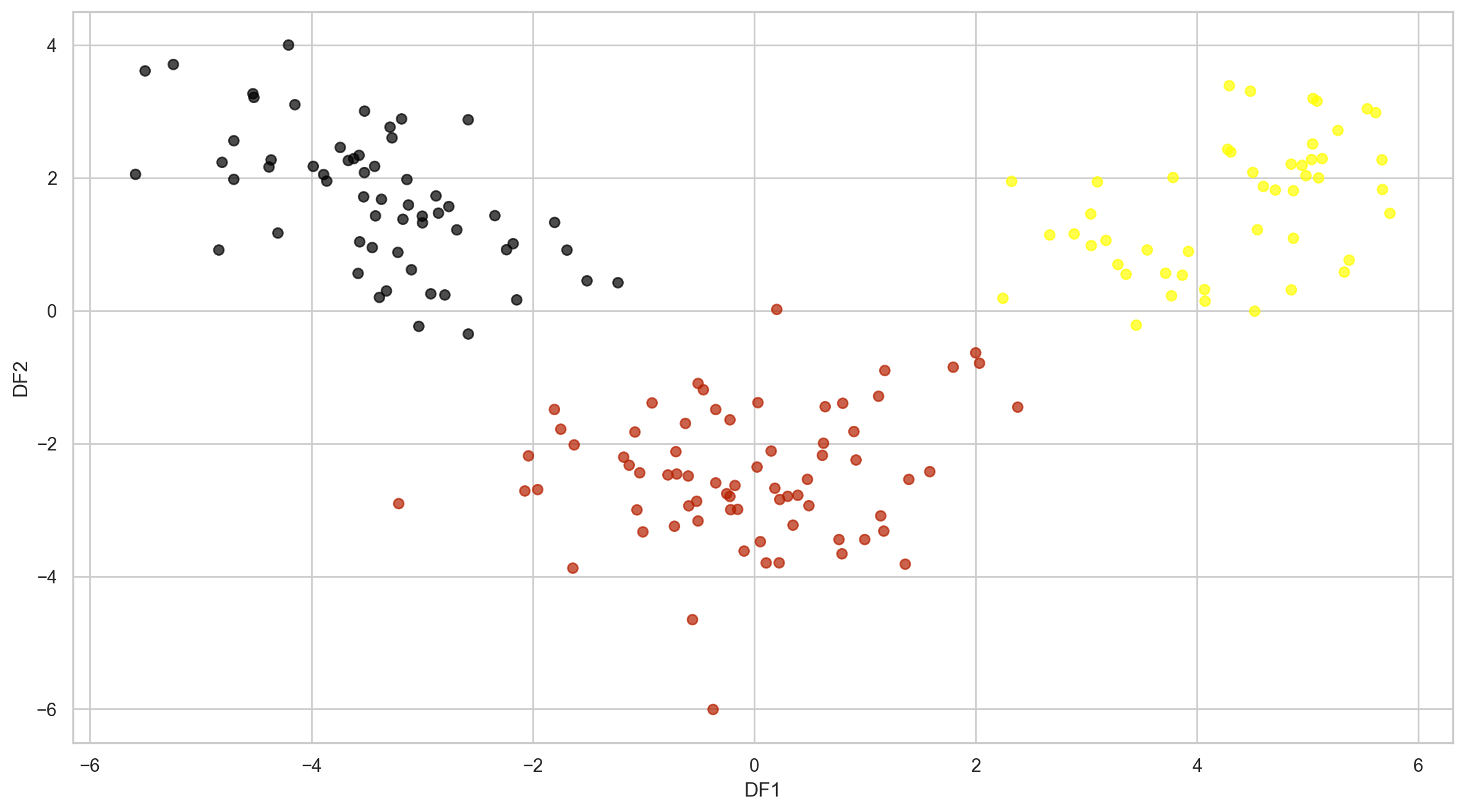
plt.figure(figsize = (15,8))
plt.scatter(X_r2[:,0], X_r2[:,1], c = dataset.target,cmap = 'gnuplot', alpha = 0.7)
plt.xlabel('DF1')
plt.ylabel('DF2')
plt.show()

8.2 Distribution of LDA Components

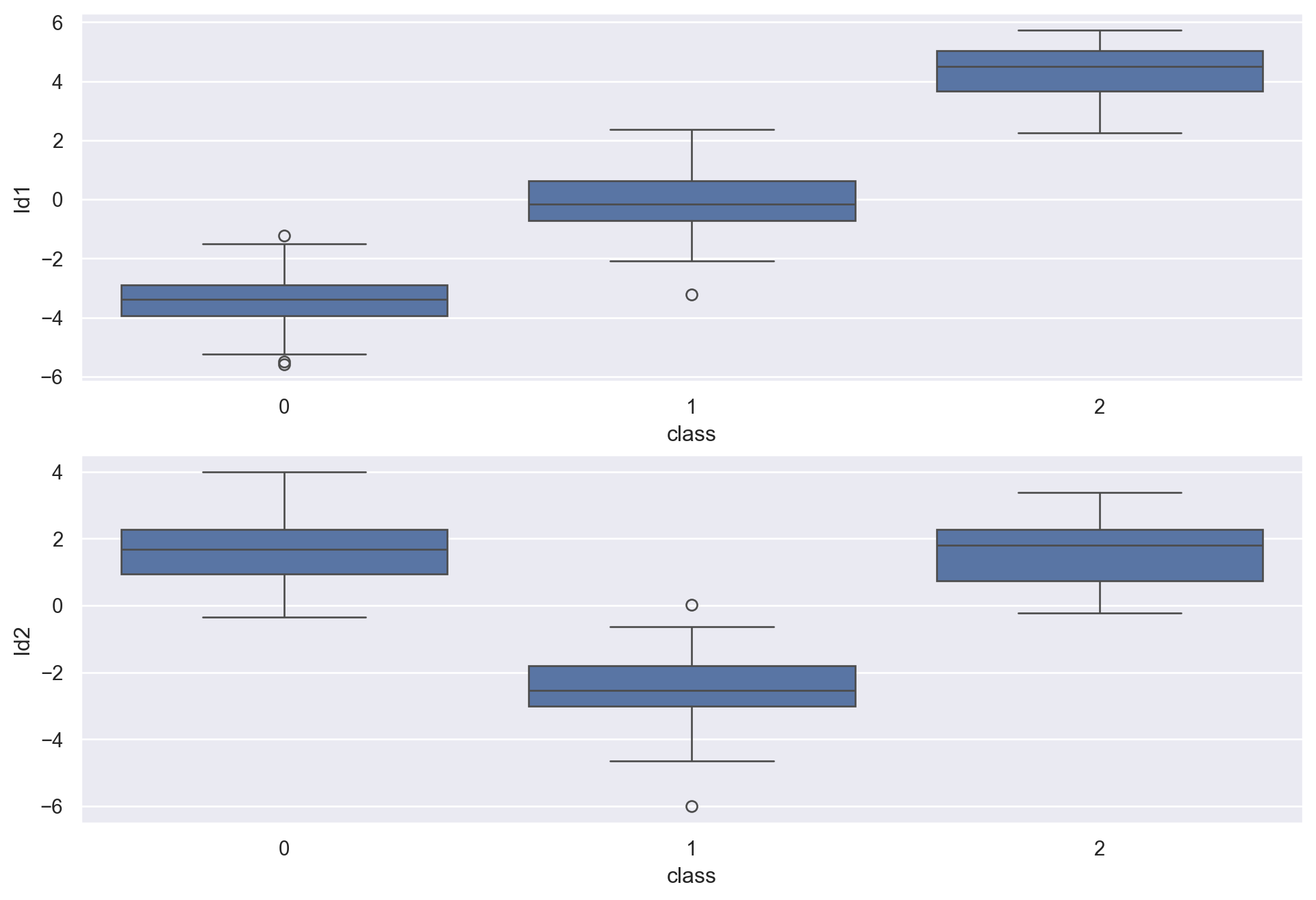
df_lda = pd.DataFrame(zip(X_r2[:,0], X_r2[:,1],y), columns = ["ld1", "ld2", "class"])
sns.set(rc={'figure.figsize':(12,8)})
plt.subplot(2,1,1)
sns.boxplot(data = df_lda, x = 'class', y = 'ld1')
plt.subplot(2,1,2)
sns.boxplot(data = df_lda, x = 'class', y = 'ld2')
plt.show()

9 Using LDA to Solve Classification Problem

from sklearn.model_selection import train_test_split
X_train, X_test, y_train, y_test = train_test_split(X,y, test_size = 0.25, random_state = 2024)

9.1 Training the Model

lda_model = LinearDiscriminantAnalysis(n_components = 2)
lda_model.fit(X_train, y_train)
LinearDiscriminantAnalysis(n_components=2)
In a Jupyter environment, please rerun this cell to show the HTML representation or trust the notebook.
On GitHub, the HTML representation is unable to render, please try loading this page with nbviewer.org.

9.2 Testing the Model

y_pred = lda_model.predict(X_test)

9.3 Checking Model Accuracy

from sklearn.metrics import accuracy_score
print ("The Accuracy of LDA Model is %0.2f%%." % (accuracy_score(y_test, y_pred)*100))
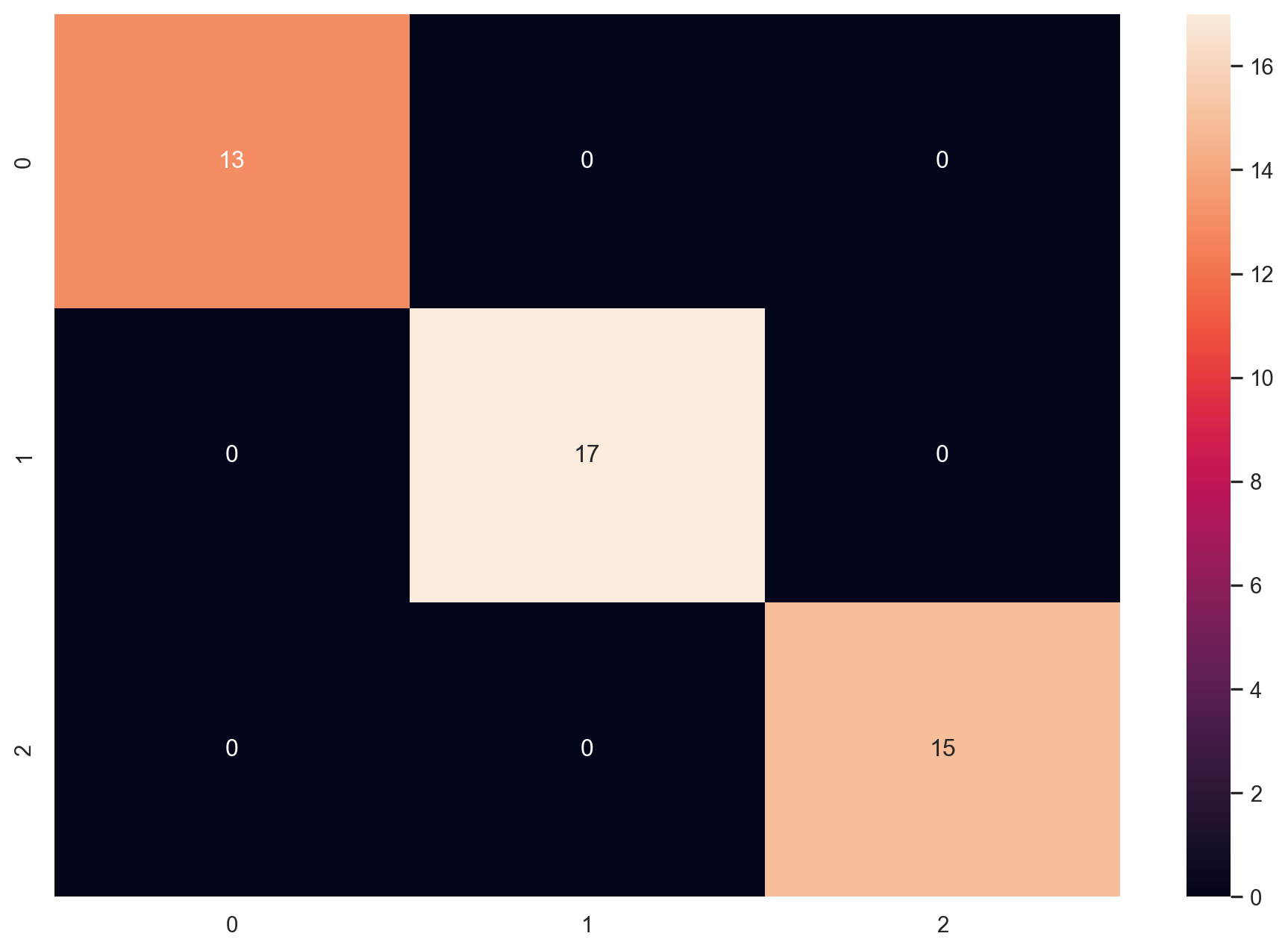
The Accuracy of LDA Model is 100.00%.
from sklearn.metrics import confusion_matrix, classification_report
confusion_matrix(y_test, y_pred)
sns.heatmap(confusion_matrix(y_test, y_pred), annot=True)
plt.show()

10 Cross Validation

from sklearn.model_selection import RepeatedStratifiedKFold
from sklearn.model_selection import cross_val_score
cv = RepeatedStratifiedKFold(n_splits = 10, n_repeats = 50, random_state = 1)
scores = cross_val_score(lda_model, X,y, scoring = "accuracy", cv = cv, n_jobs = -1)
print(np.mean(scores))

11 LDA vs PCA (Visualization Difference)

11.1 PCA Model

from sklearn.decomposition import PCA
pca = PCA(n_components = 2)
X_pca = pca.fit(X).transform(X)
from pylab import *
subplot(2,1,1)
title ("PCA")
plt.scatter(X_pca[:,0], X_pca[:,1], c = dataset.target, cmap = "gnuplot")
subplot(2,1,2)
title ("LDA")
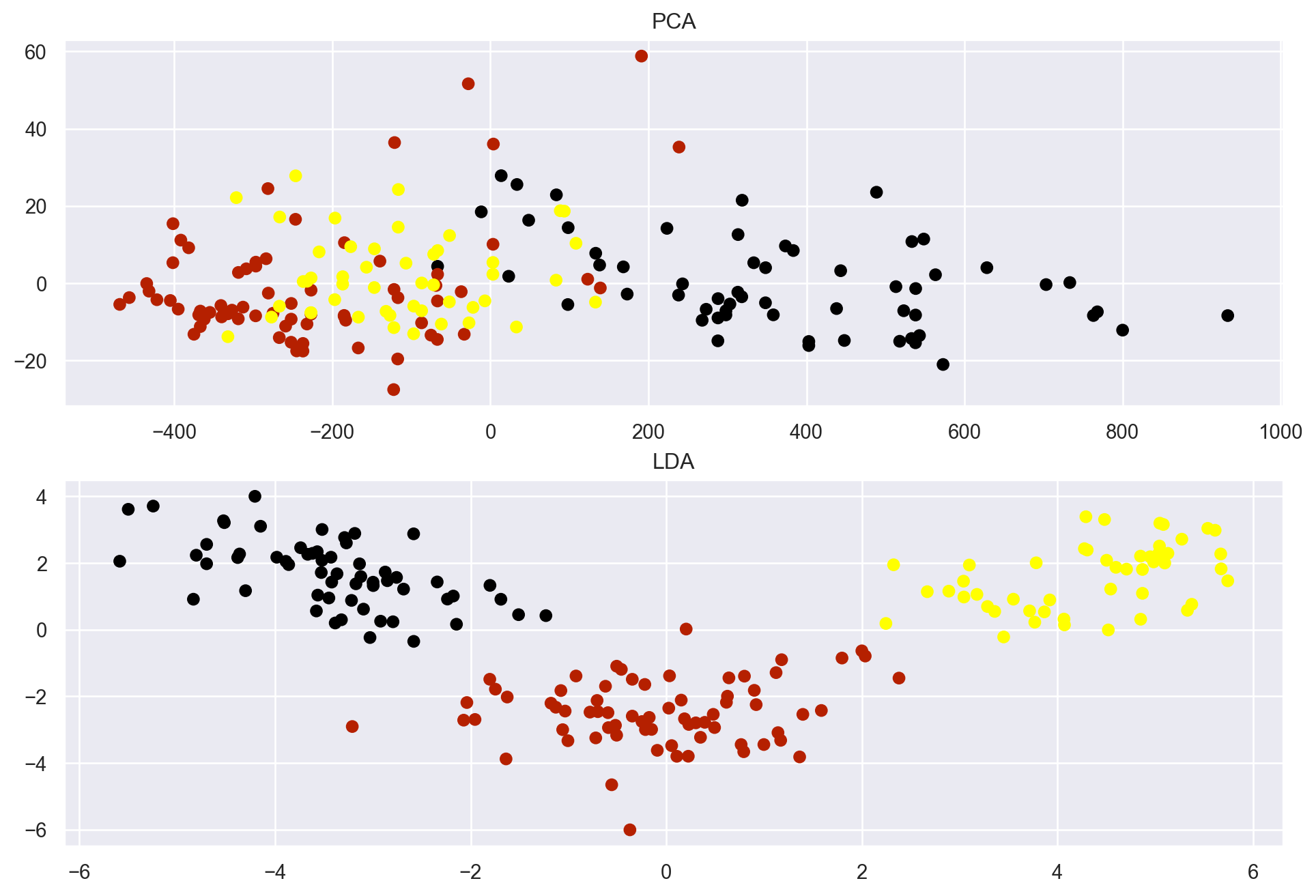
plt.scatter(X_r2[:,0], X_r2[:,1], c = dataset.target, cmap = "gnuplot")
plt.show()

Both algorithms have successfully reduced the components but created different clusters because both have reduced the components based on different principles.

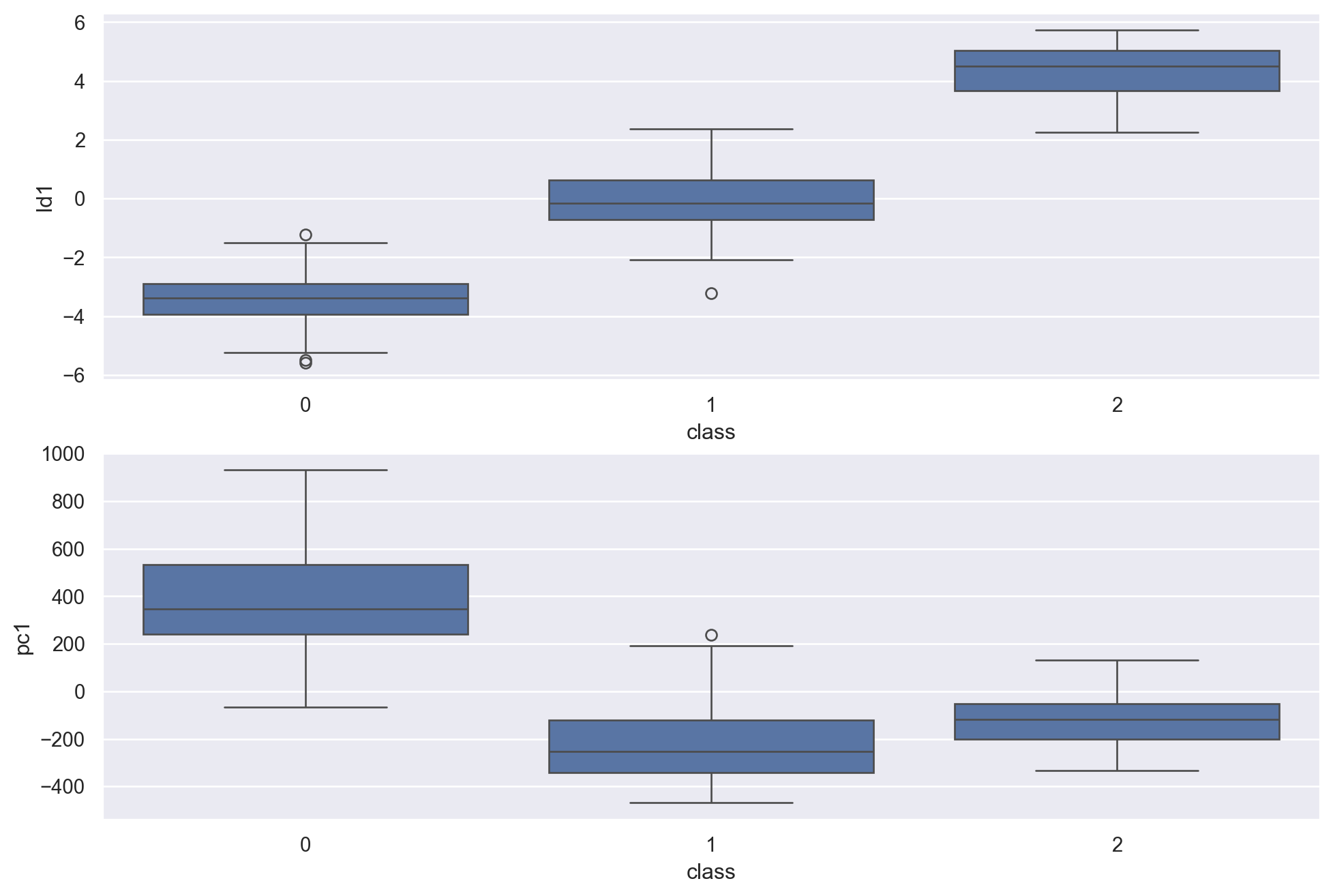
Now let’s also visualize and compare the distributions of each of the algorithms on their respective components. Here we will visualize the distribution of the first component of each algorithm (LDA-1 and PCA-1).

# creating dataframs
df=pd.DataFrame(zip(X_pca[:,0],X_r2[:,0],y),columns=["pc1","ld1","class"])
# plotting the lda1
plt.subplot(2,1,1)
sns.boxplot(x='class', y='ld1', data=df)
# plotting pca1
plt.subplot(2,1,2)
sns.boxplot(x='class', y='pc1', data=df)
plt.show()

There is a slight difference in the distribution of both of the algorithms. For example, the PCA result shows outliers only at the first target variable, whereas the LDA result contains outliers for every target variable.

12 Variance Covariance Matrix

To calculate the covariance matrix in Python using NumPy, you can import NumPy as np, create or load your data as a NumPy array, subtract the mean of each column from the data, transpose the array, multiply the transposed array and original array, divide the multiplied array by the number of observations, and print the array. Alternatively, you can use the np.cov function which takes the data array as an input and returns the covariance matrix as an output.

To learn more about variance-covariance matrix.

To learn more about eigenvalues and eigenvectors.

A = [45, 37, 42, 35, 39]
B = [38, 31, 26, 28, 33]
C = [10, 15, 17, 21, 12]

data = np.array([A, B, C])

cov_matrix = np.cov(data, bias=True)
print(cov_matrix)
[[ 12.64   7.68  -9.6 ]
 [  7.68  17.36 -13.8 ]
 [ -9.6  -13.8   14.8 ]]
np.var(A)
np.float64(12.64)
np.var(C)
np.float64(14.8)

12.1 Eigenvalues and Eigenvector for Variance-covariance Matrix

# eigendecomposition
from numpy.linalg import eig
# calculate eigendecomposition
values, vectors = eig(cov_matrix)
# Eigenvalues 
print(values)
[36.22111819  6.98906964  1.58981217]
# Eigenvectors 
print(vectors)
[[-0.45932764 -0.83268027  0.30929225]
 [-0.63870049  0.55159313  0.53647618]
 [ 0.61731661 -0.04887322  0.78519527]]

13 Regularized Discriminant Analysis

Since regularization techniques have been highly successful in the solution of ill-posed and poorly-posed inverse problems so to mitigate this problem the most reliable way is to use the regularization technique.

  • A poorly posed problem occurs when the number of parameters to be estimated is comparable to the number of observations.

  • Similarly,ill-posed if that number exceeds the sample size.

In these cases the parameter estimates can be highly unstable, giving rise to high variance. Regularization would help to improve the estimates by shifting them away from their sample-based values towards values that are more physically valid; this would be achieved by applying shrinkage to each class.

While regularization reduces the variance associated with the sample-based estimate, it may also increase bias. This process known as bias-variance trade-off is generally controlled by one or more degree-of-belief parameters that determine how strongly biasing towards “plausible” values of population parameters takes place.

Whenever the sample size is not significantly greater than the dimension of measurement space for any class, Quantitative discriminant analysis (QDA) is ill-posed. Typically, regularization is applied to a discriminant analysis by replacing the individual class sample covariance matrices with the average weights assigned to the eigenvalues.

This applies a considerable degree of regularization by substantially reducing the number of parameters to be estimated. The regularization parameter () which is added to the equation of QDA and LDA takes a value between 0 to 1. It controls the degree of shrinkage of the individual class covariance matrix estimates toward the pooled estimate. Values between these limits represent degrees of regularization.

from sklearn.metrics import ConfusionMatrixDisplay,precision_score,recall_score,confusion_matrix
from imblearn.over_sampling import SMOTE # To install module, run this line of code - pip install imblearn
from sklearn.model_selection import train_test_split,cross_val_score,RepeatedStratifiedKFold,GridSearchCV
# Reading a new dataset 
df = pd.read_csv('DATA/healthcare-dataset-stroke-data.csv')
print("Records = ", df.shape[0], "\nFeatures = ", df.shape[1])
Records =  5110 
Features =  12
df.sample(5)
id gender age hypertension heart_disease ever_married work_type Residence_type avg_glucose_level bmi smoking_status stroke
3837 27854 Female 23.0 0 0 No Private Rural 96.28 31.1 never smoked 0
3969 33185 Male 59.0 0 0 No Govt_job Urban 83.60 27.5 formerly smoked 0
3924 39958 Male 18.0 0 0 No Private Rural 118.93 22.4 never smoked 0
732 31308 Female 49.0 0 0 Yes Private Urban 114.50 35.9 formerly smoked 0
794 21688 Female 42.0 0 0 Yes Private Rural 88.31 24.0 smokes 0
df.info()
<class 'pandas.core.frame.DataFrame'>
RangeIndex: 5110 entries, 0 to 5109
Data columns (total 12 columns):
 #   Column             Non-Null Count  Dtype  
---  ------             --------------  -----  
 0   id                 5110 non-null   int64  
 1   gender             5110 non-null   object 
 2   age                5110 non-null   float64
 3   hypertension       5110 non-null   int64  
 4   heart_disease      5110 non-null   int64  
 5   ever_married       5110 non-null   object 
 6   work_type          5110 non-null   object 
 7   Residence_type     5110 non-null   object 
 8   avg_glucose_level  5110 non-null   float64
 9   bmi                4909 non-null   float64
 10  smoking_status     5110 non-null   object 
 11  stroke             5110 non-null   int64  
dtypes: float64(3), int64(4), object(5)
memory usage: 479.2+ KB
# Missing Values 
(df.isnull().sum()/len(df)*100)
id                   0.000000
gender               0.000000
age                  0.000000
hypertension         0.000000
heart_disease        0.000000
ever_married         0.000000
work_type            0.000000
Residence_type       0.000000
avg_glucose_level    0.000000
bmi                  3.933464
smoking_status       0.000000
stroke               0.000000
dtype: float64
# Dropping the Missing Observations
df.dropna(axis = 0, inplace = True)
df.shape
(4909, 12)
# Creating the Dummies 
df_pre = pd.get_dummies(df, drop_first = True)
df_pre.sample(5)
id age hypertension heart_disease avg_glucose_level bmi stroke gender_Male gender_Other ever_married_Yes work_type_Never_worked work_type_Private work_type_Self-employed work_type_children Residence_type_Urban smoking_status_formerly smoked smoking_status_never smoked smoking_status_smokes
2600 44112 51.0 0 0 219.92 33.5 0 False False True False False True False True True False False
4691 25878 55.0 0 0 97.68 47.1 0 True False True False False True False False True False False
1389 68235 12.0 0 0 86.00 20.1 0 True False False False False False True False True False False
4597 40842 29.0 0 0 108.14 25.1 0 False False True False True False False False True False False
768 59521 33.0 0 0 74.88 31.6 0 True False True False True False False False False False True
# Training and Testing the Split 
X = df_pre.drop(['stroke'], axis = 1)
y = df_pre['stroke']
X_train, X_test, y_train, y_test = train_test_split(X,y, test_size = 0.30, random_state = 25)
# Building the LDA
LDA = LinearDiscriminantAnalysis()
LDA.fit_transform(X_train, y_train)
X_test['predictions'] = LDA.predict(X_test)
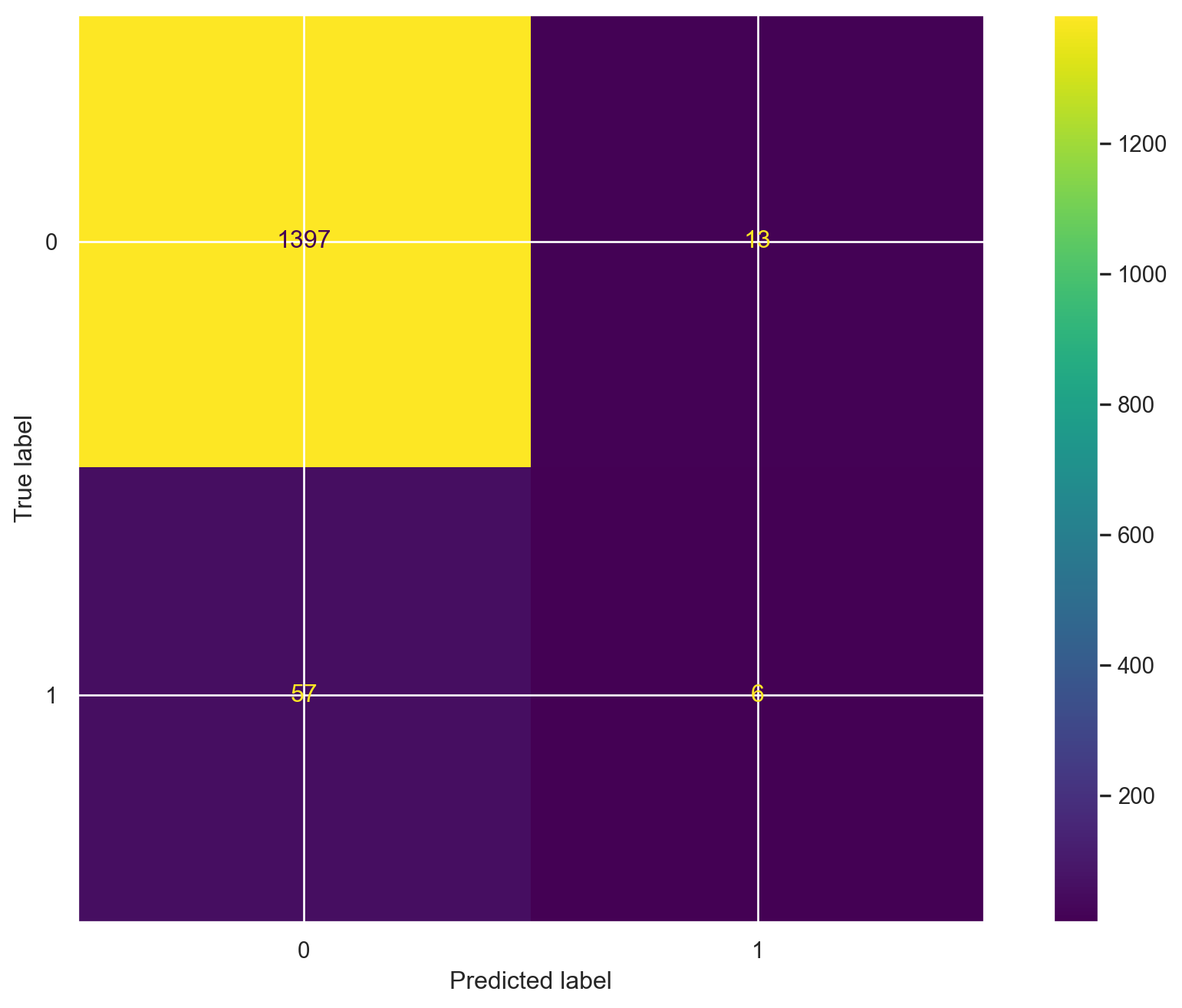
ConfusionMatrixDisplay.from_predictions(y_test, X_test['predictions'])
plt.show()

tn, fp, fn, tp = confusion_matrix(list(y_test), list(X_test['predictions']), labels=[0, 1]).ravel()
print('True Positive :', tp)
print('True Negative :', tn)
print('False Positive :', fp)
print('False Negative :', fn)
print("Precision score",precision_score(y_test,X_test['predictions']))
True Positive : 6
True Negative : 1397
False Positive : 13
False Negative : 57
Precision score 0.3157894736842105

It has only 32% precision rate, which is very poor performance.

print("Accuracy Score",accuracy_score(y_test,X_test['predictions']))
Accuracy Score 0.9524779361846571

The accuracy is approximately 95%, but the precision is 32%.

13.1 Cross Validation of the Dataset

from sklearn.model_selection import RepeatedStratifiedKFold
from sklearn.model_selection import cross_val_score
#Define method to evaluate model
cv = RepeatedStratifiedKFold(n_splits=10, n_repeats=50, random_state=1)

#evaluate model
scores = cross_val_score(LDA, X_train, y_train, scoring='precision', cv=cv, n_jobs=-1)
print(np.mean(scores)) 
0.23822585829203477
#evaluate model
scores = cross_val_score(LDA, X_train, y_train, scoring='accuracy', cv=cv, n_jobs=-1)
print(np.mean(scores)) 
0.9466250593260561

Even after cross validation, the precision is about 24% and the accuracy is 95% approximately. There is no significant improvement of the metrics of the model.

14 Regularizing and Shrinking the LDA

df_pre['stroke'].value_counts()
stroke
0    4700
1     209
Name: count, dtype: int64

As observed by the value count of the dependent variable the data is imbalanced as the quantity of 1’s is approx 4% of the total dependent variable. So, it needs to be balanced for the learner to be a good predictor.

14.1 Balancing the Dependent Variable

There are two ways by which the data can be synthesized: one by oversampling and the second, by undersampling. In this scenario, oversampling is better which will synthesize the lesser category linear interpolation.

oversample = SMOTE()
X_smote, y_smote = oversample.fit_resample(X, y)
Xs_train, Xs_test, ys_train, ys_test = train_test_split(X_smote, y_smote, test_size=0.30, random_state=42)

The imbalance is mitigated by using the Synthetic Minority Oversampling Technique (SMOTE) but this will not help much we also need to regularize the leaner by using the GridSearchCV which will find the best parameters for the learner and add a penalty to the solver which will shrink the eigenvalue i.e regularization.

cv = RepeatedStratifiedKFold(n_splits=10, n_repeats=3, random_state=42)
grid = dict()
grid['solver'] = ['eigen','lsqr']
grid['shrinkage'] = ['auto',0.2,1,0.3,0.5]
search = GridSearchCV(LDA, grid, scoring='precision', cv=cv, n_jobs=-1)
results = search.fit(Xs_train, ys_train)
print('Precision: %.3f' % results.best_score_)
print('Configuration:',results.best_params_)
Precision: 0.879
Configuration: {'shrinkage': 'auto', 'solver': 'eigen'}

The precision score jumped right from 35% to 87% with the help of regularization and shrinkage of the learner and the best solver for the Linear Discriminant Analysis is eigen and the shrinkage method is auto which uses the Ledoit-Wolf lemma for finding the shrinkage penalty.

15 Building the Regularized Discriminant Analysis (RDA)

# Build the RDA
LDA_final=LinearDiscriminantAnalysis(shrinkage='auto', solver='eigen')
LDA_final.fit_transform(Xs_train,ys_train)
Xs_test['predictions']=LDA_final.predict(Xs_test)
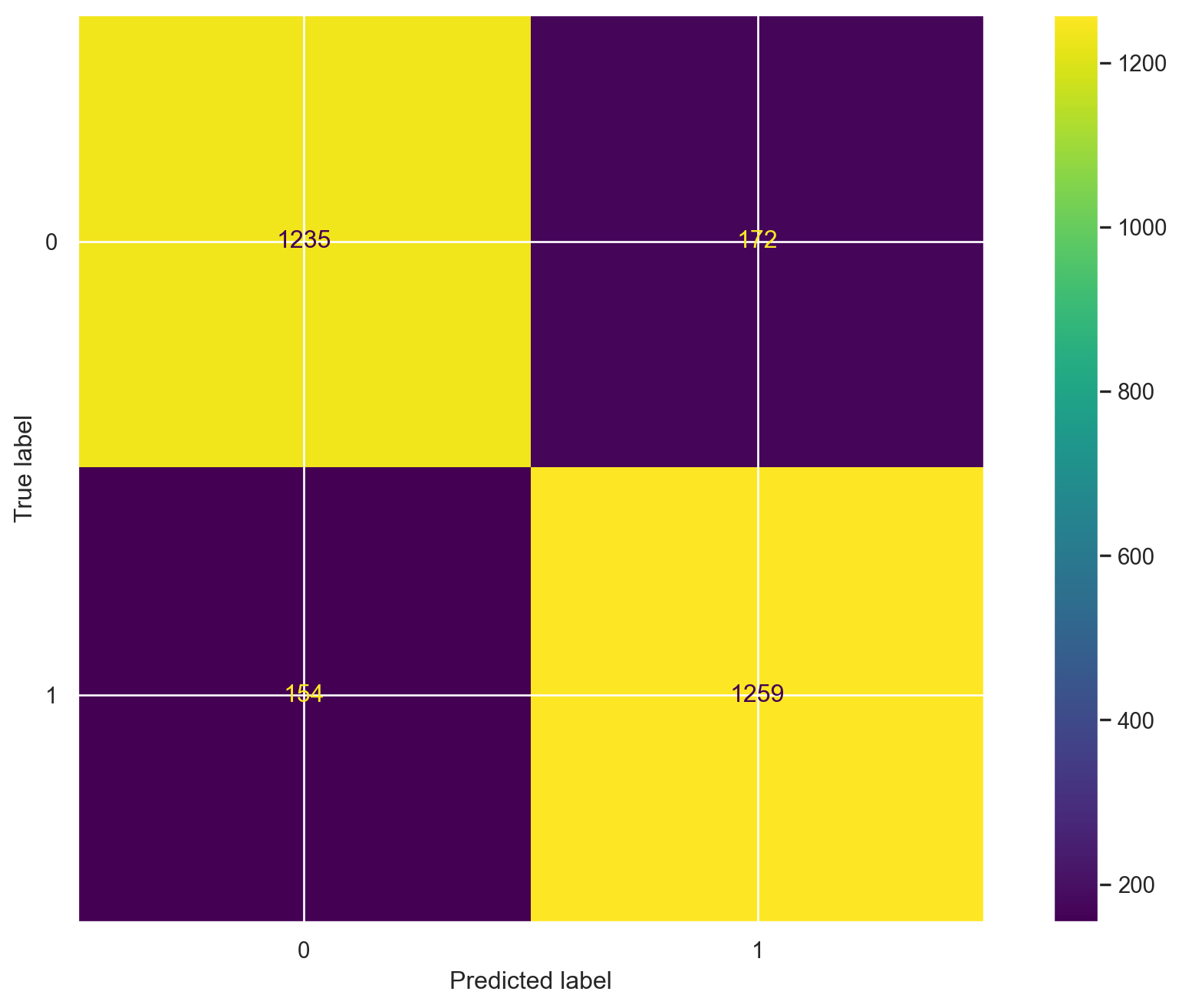
ConfusionMatrixDisplay.from_predictions(ys_test, Xs_test['predictions'])
plt.show()
 
tn, fp, fn, tp = confusion_matrix(list(ys_test), list(Xs_test['predictions']), labels=[0, 1]).ravel()
 
print('True Positive :', tp)
print('True Negative :', tn)
print('False Positive :', fp)
print('False Negative :', fn)

True Positive : 1259
True Negative : 1235
False Positive : 172
False Negative : 154
print("Precision score",np.round(precision_score(ys_test,Xs_test['predictions']),3))
Precision score 0.88
print("Accuracy score",np.round(accuracy_score(ys_test,Xs_test['predictions']),3))
Accuracy score 0.884

16 Conclusion

Back to top