Chapter # 04
Logistic Regression

1 Introduction

2 Loading Python Package

import pandas as pd
import numpy as np
import matplotlib.pyplot as plt 
import seaborn as sns
# For Visualization
sns.set(style = "white")
sns.set(style = "whitegrid", color_codes = True)

import sklearn # For Machine Learning 

import warnings 
warnings.filterwarnings('ignore')

import sys
sys.version

print ('The Scikit-learn version that is used for this code file is {}'.format(sklearn.__version__))
The Scikit-learn version that is used for this code file is 1.6.0

3 Loading Dataset

# Importing Training Dataset 
train_df = pd.read_csv("DATA/train.csv")
# Importing Testing Dataset
test_df = pd.read_csv("DATA/test.csv")

3.1 Metadata of the Dataset

print("The total number of rows and columns in the dataset is {} and {} respectively.".format(train_df.shape[0],train_df.shape[1]))
print ("\nThe names and the types of the variables of the dataset:")
train_df.info()
train_df.head()
print("\nThe types of the variables in the dataset are:")
train_df.dtypes
The total number of rows and columns in the dataset is 891 and 12 respectively.

The names and the types of the variables of the dataset:
<class 'pandas.core.frame.DataFrame'>
RangeIndex: 891 entries, 0 to 890
Data columns (total 12 columns):
 #   Column       Non-Null Count  Dtype  
---  ------       --------------  -----  
 0   PassengerId  891 non-null    int64  
 1   Survived     891 non-null    int64  
 2   Pclass       891 non-null    int64  
 3   Name         891 non-null    object 
 4   Sex          891 non-null    object 
 5   Age          714 non-null    float64
 6   SibSp        891 non-null    int64  
 7   Parch        891 non-null    int64  
 8   Ticket       891 non-null    object 
 9   Fare         891 non-null    float64
 10  Cabin        204 non-null    object 
 11  Embarked     889 non-null    object 
dtypes: float64(2), int64(5), object(5)
memory usage: 83.7+ KB

The types of the variables in the dataset are:
PassengerId      int64
Survived         int64
Pclass           int64
Name            object
Sex             object
Age            float64
SibSp            int64
Parch            int64
Ticket          object
Fare           float64
Cabin           object
Embarked        object
dtype: object
for x in train_df.columns:
  print  (x)
train_df['Pclass'].value_counts(sort = True, ascending = True)
PassengerId
Survived
Pclass
Name
Sex
Age
SibSp
Parch
Ticket
Fare
Cabin
Embarked
Pclass
2    184
1    216
3    491
Name: count, dtype: int64
train_df['Sex'].value_counts()
Sex
male      577
female    314
Name: count, dtype: int64

4 Data Quality & Missing Value Assessment

# Missing value in Training Dataset 
train_df.isna().sum()
PassengerId      0
Survived         0
Pclass           0
Name             0
Sex              0
Age            177
SibSp            0
Parch            0
Ticket           0
Fare             0
Cabin          687
Embarked         2
dtype: int64
# Missing value in Testing Dataset 
test_df.isnull().sum()
PassengerId      0
Pclass           0
Name             0
Sex              0
Age             86
SibSp            0
Parch            0
Ticket           0
Fare             1
Cabin          327
Embarked         0
dtype: int64

4.1 Age - Missing Value

print ('The percent of missing "Age" record in the training dataset is %0.2f%%' %(train_df['Age'].isnull().sum()/train_df.shape[0]*100))
The percent of missing "Age" record in the training dataset is 19.87%
print ('The percent of missing "Age" record in testing dataset is %0.3f%%' %(test_df['Age'].isnull().sum()/test_df.shape[0]*100))
The percent of missing "Age" record in testing dataset is 20.574%
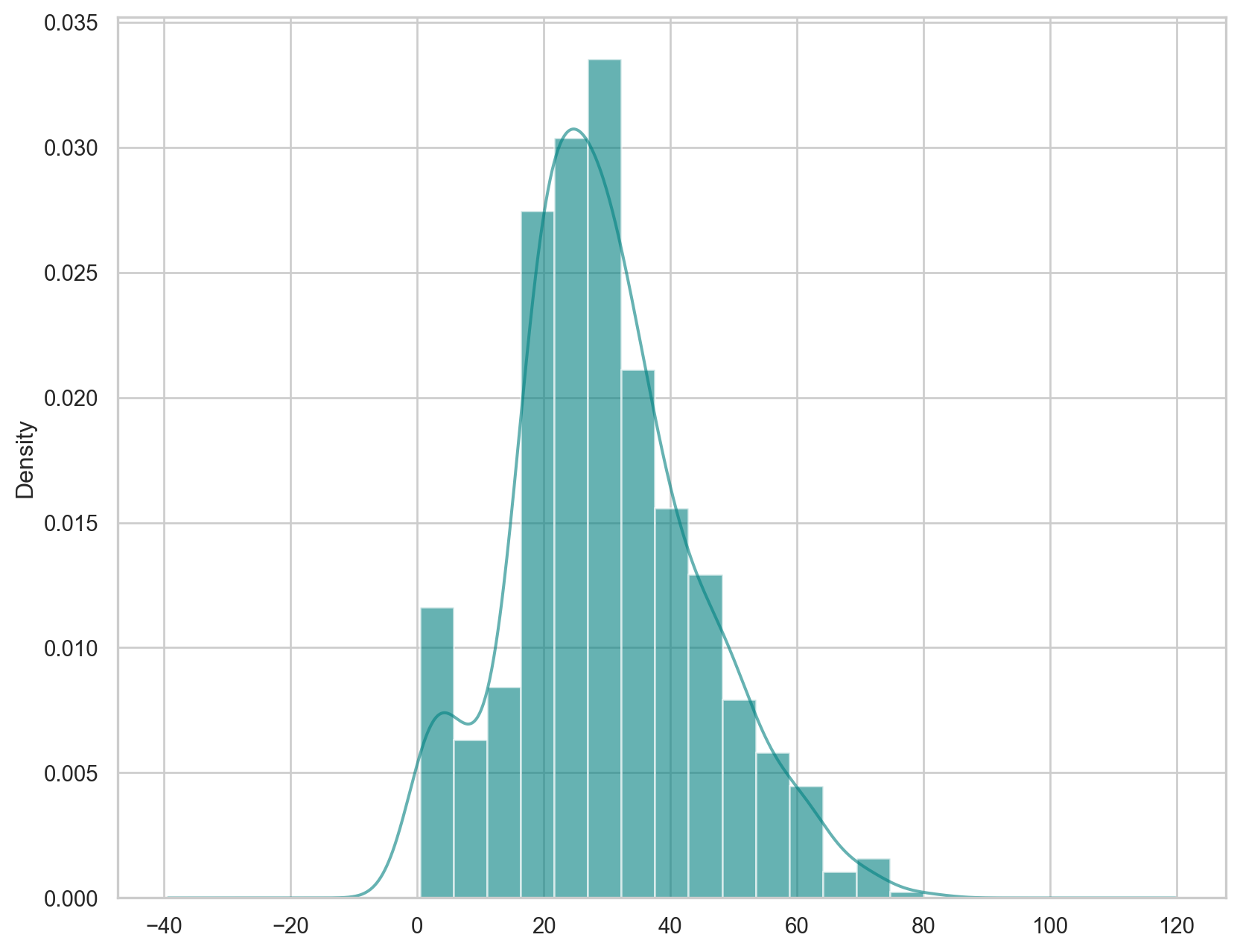
plt.figure(figsize = (10,8))
train_df['Age'].hist(bins = 15, density = True, color = 'teal', alpha = 0.60)
train_df['Age'].plot(kind = 'density', color = 'teal', alpha = 0.60)
plt.show()

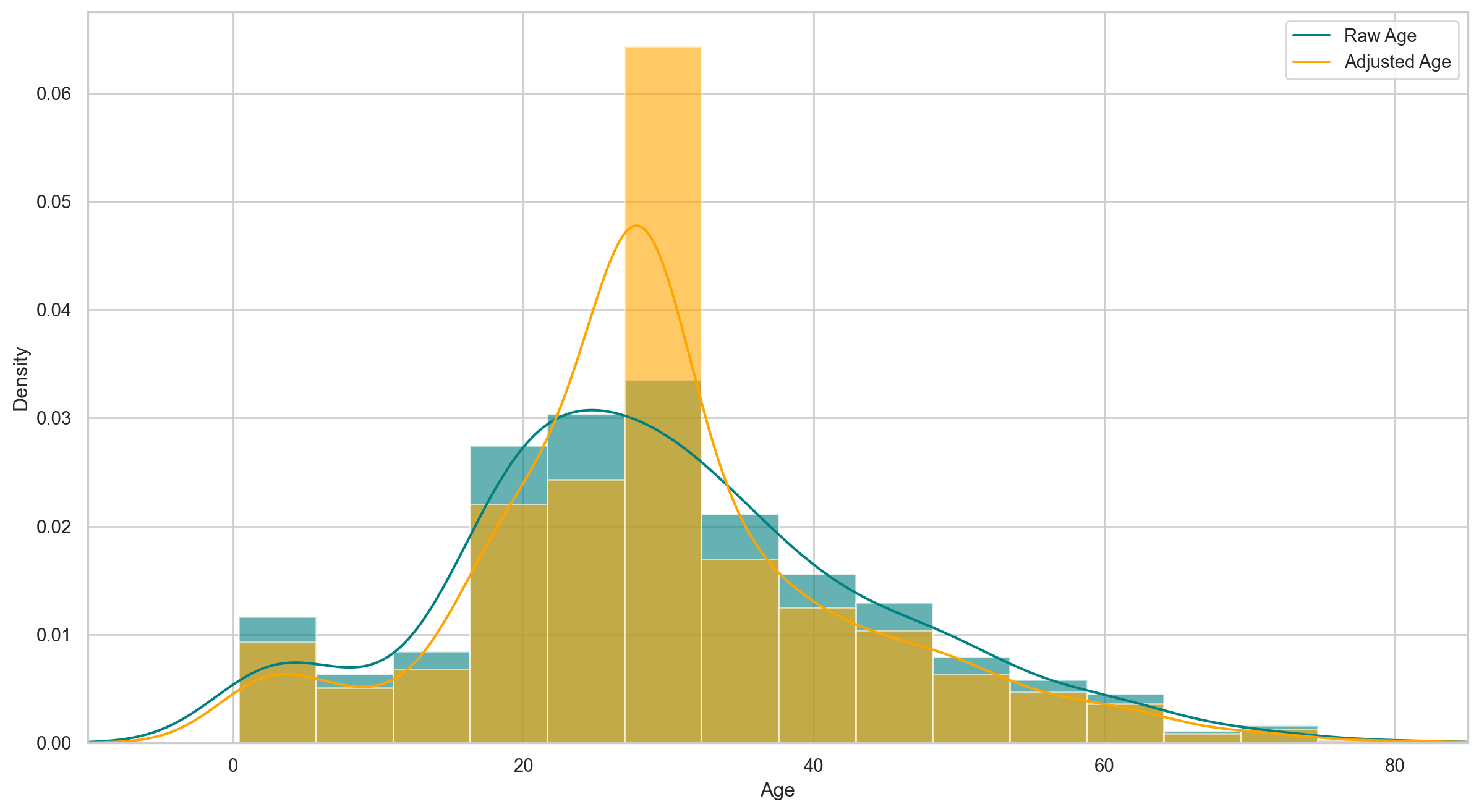
Since the variable Age is a little bit right skewed, using the mean to replace the missing observations might bias our results. Therefore, it is recommended that median be used to replace the missing observations.

print ('The mean of "Age" variable is %0.3f.' %(train_df['Age'].mean(skipna = True)))
The mean of "Age" variable is 29.699.
print ('The median of "Age" variable is %0.2f.' %(train_df['Age'].median(skipna = True)))
The median of "Age" variable is 28.00.

4.2 Cabin - Missing Value

train_df['Cabin'].value_counts()
Cabin
G6             4
C23 C25 C27    4
B96 B98        4
F2             3
D              3
              ..
E17            1
A24            1
C50            1
B42            1
C148           1
Name: count, Length: 147, dtype: int64
print ('The percent of cabin variable missing value is %0.2f%%.' %(train_df['Cabin'].isnull().sum()/train_df.shape[0]*100))
The percent of cabin variable missing value is 77.10%.

77% observations of the Cabin variable is missing. Therefore, it is better to prune the variable from the dataset. Moreover, the drop of the Cabin variable is justified because it has correlation with two other variables - Fare and Pclass.

4.3 Embarked - Missing Value

train_df['Embarked'].value_counts()
Embarked
S    644
C    168
Q     77
Name: count, dtype: int64
# Percent of missing 'Embarked' Variable
print(
    "The percent of missing 'Embarked' records is %.2f%%" %
    (train_df['Embarked'].isnull().sum()/train_df.shape[0]*100)
)
The percent of missing 'Embarked' records is 0.22%

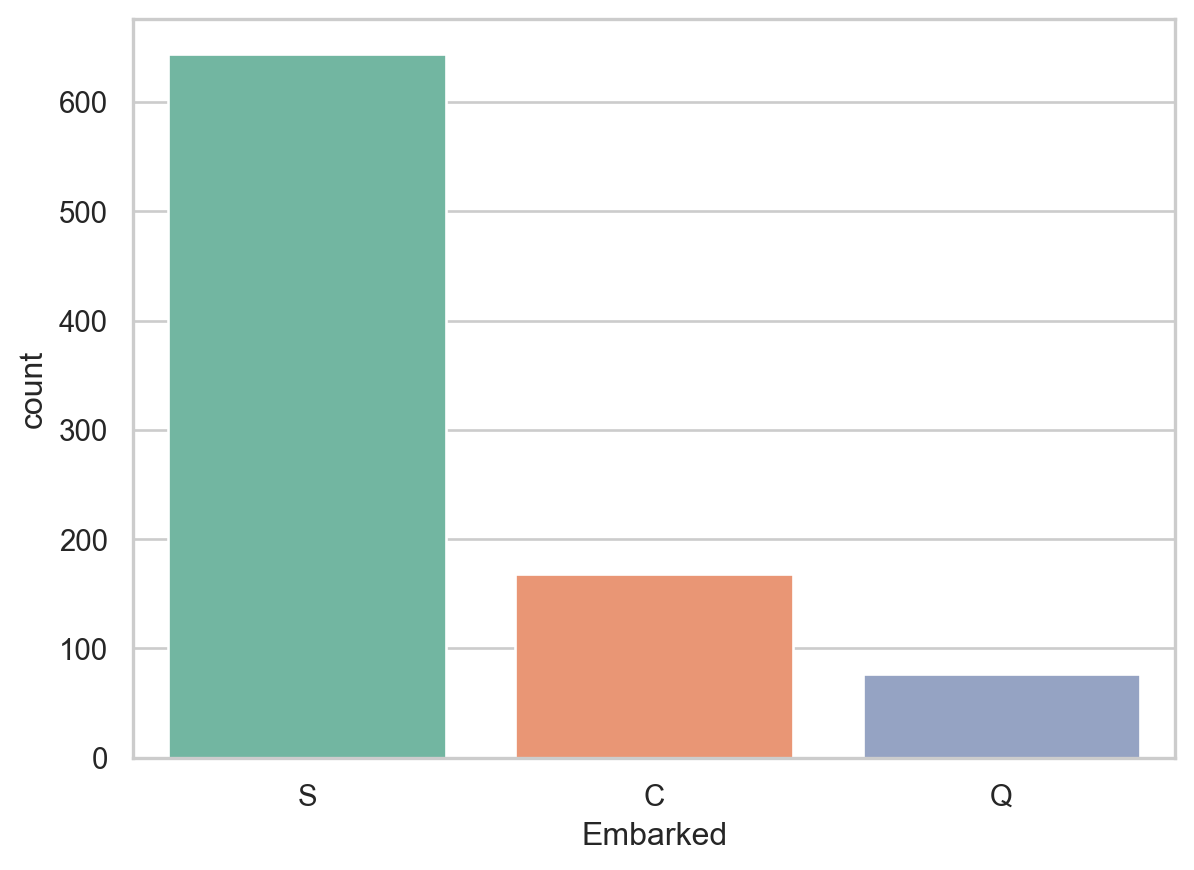
Since there are only 0.22% missing observation for Embarked, we can impute the missing values with the port where most people embarked.

print('Boarded passengers grouped by port of embarkation (C = Cherbourg, Q = Queenstown, S = Southampton):')
print(train_df['Embarked'].value_counts())
sns.countplot(x='Embarked', data=train_df, palette='Set2')
plt.show()
Boarded passengers grouped by port of embarkation (C = Cherbourg, Q = Queenstown, S = Southampton):
Embarked
S    644
C    168
Q     77
Name: count, dtype: int64

print('The most common boarding port of embarkation is %s.' %train_df['Embarked'].value_counts().idxmax())
The most common boarding port of embarkation is S.

5 Final Adjustment to the Datasets (Training & Testing)

Based on the assessment of the missing values in the dataset, We will make the following changes to the data:

  • The missing value of Age variable will be imputed with 28 (median value Age)
  • The missing value of Embarked variable will be imputed with S (the most common boarding point)
  • There are many missing values for the variable Cabin; therefore, the variable will be dropped. Moreover, the drop will not affect the model as the variable is associated with two other variables - Pclass and Fare.
train_data = train_df.copy()
train_data['Age'].fillna(train_data['Age'].median(skipna = True), inplace = True)
train_data['Embarked'].fillna(train_data['Embarked'].value_counts().idxmax(), inplace = True)
train_data.drop(['Cabin'], axis = 1, inplace = True)
train_data.isnull().sum()
PassengerId    0
Survived       0
Pclass         0
Name           0
Sex            0
Age            0
SibSp          0
Parch          0
Ticket         0
Fare           0
Embarked       0
dtype: int64
train_data.tail()
PassengerId Survived Pclass Name Sex Age SibSp Parch Ticket Fare Embarked
886 887 0 2 Montvila, Rev. Juozas male 27.0 0 0 211536 13.00 S
887 888 1 1 Graham, Miss. Margaret Edith female 19.0 0 0 112053 30.00 S
888 889 0 3 Johnston, Miss. Catherine Helen "Carrie" female 28.0 1 2 W./C. 6607 23.45 S
889 890 1 1 Behr, Mr. Karl Howell male 26.0 0 0 111369 30.00 C
890 891 0 3 Dooley, Mr. Patrick male 32.0 0 0 370376 7.75 Q
plt.figure(figsize=(15,8))
# Data with missing observations
ax = train_df['Age'].hist(bins = 15, density = True, stacked = True, color = 'teal', alpha = 0.6)
train_df['Age'].plot(kind = 'density', color = 'teal')
# Data without missing observations
ax = train_data['Age'].hist(bins = 15, density = True, stacked = True, color = 'orange', alpha = 0.6)
train_data['Age'].plot(kind = 'density', color = 'orange')
plt.xlim(-10,85)
ax.legend(["Raw Age", "Adjusted Age"])
ax.set(xlabel = 'Age')
plt.show()

5.1 Additional Variables

The variable SibSp means whether the passenger has sibling or spouse aboard and the variable Parch means whether the passenger has parents or children aboard. For the sake of simplicity and to account for multicollinearity, these two variables will be combined into a categorical variable: whether or not the individual was traveling alone.

# Creating categorical variable for Traveling alone
train_data['TravelAlone'] = np.where((train_data['SibSp']+train_data['Parch']) > 0, 0, 1)
train_data.drop('SibSp', axis = 1, inplace = True)
train_data.drop('Parch', axis = 1, inplace = True)

For variables Pclass, Sex, and Embarked, categorical variables will be created

training = pd.get_dummies(train_data, columns= ["Pclass", "Embarked", "Sex"])
training.info()
<class 'pandas.core.frame.DataFrame'>
RangeIndex: 891 entries, 0 to 890
Data columns (total 15 columns):
 #   Column       Non-Null Count  Dtype  
---  ------       --------------  -----  
 0   PassengerId  891 non-null    int64  
 1   Survived     891 non-null    int64  
 2   Name         891 non-null    object 
 3   Age          891 non-null    float64
 4   Ticket       891 non-null    object 
 5   Fare         891 non-null    float64
 6   TravelAlone  891 non-null    int64  
 7   Pclass_1     891 non-null    bool   
 8   Pclass_2     891 non-null    bool   
 9   Pclass_3     891 non-null    bool   
 10  Embarked_C   891 non-null    bool   
 11  Embarked_Q   891 non-null    bool   
 12  Embarked_S   891 non-null    bool   
 13  Sex_female   891 non-null    bool   
 14  Sex_male     891 non-null    bool   
dtypes: bool(8), float64(2), int64(3), object(2)
memory usage: 55.8+ KB
training[['Pclass_1','Pclass_2','Pclass_3', 'Embarked_C','Embarked_Q','Embarked_S', 'Sex_female', 'Sex_male']].head()
Pclass_1 Pclass_2 Pclass_3 Embarked_C Embarked_Q Embarked_S Sex_female Sex_male
0 False False True False False True False True
1 True False False True False False True False
2 False False True False False True True False
3 True False False False False True True False
4 False False True False False True False True
training.drop(['Sex_female', 'PassengerId', 'Name', 'Ticket'], axis=1, inplace = True)
training.tail()
Survived Age Fare TravelAlone Pclass_1 Pclass_2 Pclass_3 Embarked_C Embarked_Q Embarked_S Sex_male
886 0 27.0 13.00 1 False True False False False True True
887 1 19.0 30.00 1 True False False False False True False
888 0 28.0 23.45 0 False False True False False True False
889 1 26.0 30.00 1 True False False True False False True
890 0 32.0 7.75 1 False False True False True False True
training.info()
<class 'pandas.core.frame.DataFrame'>
RangeIndex: 891 entries, 0 to 890
Data columns (total 11 columns):
 #   Column       Non-Null Count  Dtype  
---  ------       --------------  -----  
 0   Survived     891 non-null    int64  
 1   Age          891 non-null    float64
 2   Fare         891 non-null    float64
 3   TravelAlone  891 non-null    int64  
 4   Pclass_1     891 non-null    bool   
 5   Pclass_2     891 non-null    bool   
 6   Pclass_3     891 non-null    bool   
 7   Embarked_C   891 non-null    bool   
 8   Embarked_Q   891 non-null    bool   
 9   Embarked_S   891 non-null    bool   
 10  Sex_male     891 non-null    bool   
dtypes: bool(7), float64(2), int64(2)
memory usage: 34.1 KB
final_train = training
final_train.tail()
Survived Age Fare TravelAlone Pclass_1 Pclass_2 Pclass_3 Embarked_C Embarked_Q Embarked_S Sex_male
886 0 27.0 13.00 1 False True False False False True True
887 1 19.0 30.00 1 True False False False False True False
888 0 28.0 23.45 0 False False True False False True False
889 1 26.0 30.00 1 True False False True False False True
890 0 32.0 7.75 1 False False True False True False True
test_df.isna().sum()
PassengerId      0
Pclass           0
Name             0
Sex              0
Age             86
SibSp            0
Parch            0
Ticket           0
Fare             1
Cabin          327
Embarked         0
dtype: int64

Now we apply the same changes in the testing dataset.

  • We will apply to same imputation for Age in the Test data as we did for my Training data (if missing, Age = 28).
  • We will also remove the Cabin variable from the test data, as we’ve decided not to include it in my analysis.
  • There were no missing values in the Embarked port variable.
  • We will add the dummy variables to finalize the test set.
  • Finally, We will impute the 1 missing value for Fare with the median, 14.45.
print('The median value of "Fare" variable in testing dataset is %0.3f.' %(train_df['Fare'].median(skipna = True)))
The median value of "Fare" variable in testing dataset is 14.454.
test_data = test_df.copy()
test_data['Age'].fillna(test_data['Age'].median(skipna = True), inplace = True)
test_data['Fare'].fillna(test_data['Fare'].median(skipna = True), inplace = True)
test_data.drop(['Cabin'], axis  = 1, inplace = True)

5.2 Creating New Variables

# Creating new variable - TravelAlone
test_data['TravelAlone']= np.where(test_data['SibSp']+test_data['Parch']>0,0,1)
test_data.drop(['SibSp', 'Parch'], axis = 1, inplace = True)
test_data.sample(5)
PassengerId Pclass Name Sex Age Ticket Fare Embarked TravelAlone
66 958 3 Burns, Miss. Mary Delia female 18.0 330963 7.8792 Q 1
221 1113 3 Reynolds, Mr. Harold J male 21.0 342684 8.0500 S 1
85 977 3 Khalil, Mr. Betros male 27.0 2660 14.4542 C 0
353 1245 2 Herman, Mr. Samuel male 49.0 220845 65.0000 S 0
415 1307 3 Saether, Mr. Simon Sivertsen male 38.5 SOTON/O.Q. 3101262 7.2500 S 1

5.2.1 Creating the Dummies for Categorical Variables

testing = pd.get_dummies(test_data, columns = ['Pclass', 'Sex', 'Embarked'])
testing.drop(['Sex_female','PassengerId', 'Name', 'Ticket'], axis = 1, inplace = True)
testing.tail()
Age Fare TravelAlone Pclass_1 Pclass_2 Pclass_3 Sex_male Embarked_C Embarked_Q Embarked_S
413 27.0 8.0500 1 False False True True False False True
414 39.0 108.9000 1 True False False False True False False
415 38.5 7.2500 1 False False True True False False True
416 27.0 8.0500 1 False False True True False False True
417 27.0 22.3583 0 False False True True True False False
final_test = testing
final_test.head()
Age Fare TravelAlone Pclass_1 Pclass_2 Pclass_3 Sex_male Embarked_C Embarked_Q Embarked_S
0 34.5 7.8292 1 False False True True False True False
1 47.0 7.0000 0 False False True False False False True
2 62.0 9.6875 1 False True False True False True False
3 27.0 8.6625 1 False False True True False False True
4 22.0 12.2875 0 False False True False False False True

6 Exploratory Data Analysis (EDA)

6.1 Exploration of Age Variable

final_train.info()
<class 'pandas.core.frame.DataFrame'>
RangeIndex: 891 entries, 0 to 890
Data columns (total 11 columns):
 #   Column       Non-Null Count  Dtype  
---  ------       --------------  -----  
 0   Survived     891 non-null    int64  
 1   Age          891 non-null    float64
 2   Fare         891 non-null    float64
 3   TravelAlone  891 non-null    int64  
 4   Pclass_1     891 non-null    bool   
 5   Pclass_2     891 non-null    bool   
 6   Pclass_3     891 non-null    bool   
 7   Embarked_C   891 non-null    bool   
 8   Embarked_Q   891 non-null    bool   
 9   Embarked_S   891 non-null    bool   
 10  Sex_male     891 non-null    bool   
dtypes: bool(7), float64(2), int64(2)
memory usage: 34.1 KB
plt.figure(figsize=(15,8))
ax = sns.kdeplot(final_train['Age'][final_train.Survived == 1], shade=True, color = 'darkturquoise')
sns.kdeplot(final_train['Age'][final_train.Survived == 0], shade=True, color = 'lightcoral')
ax.legend(['Survived', 'Died']) # or you can use plt.legend(['Survived', 'Died])
plt.title('Density Plot for Surviving Population and Deceased Population')
plt.xlabel('Age') # or you can use ax.set(xlabel = 'Age')
plt.xlim(-10,85)
plt.show()

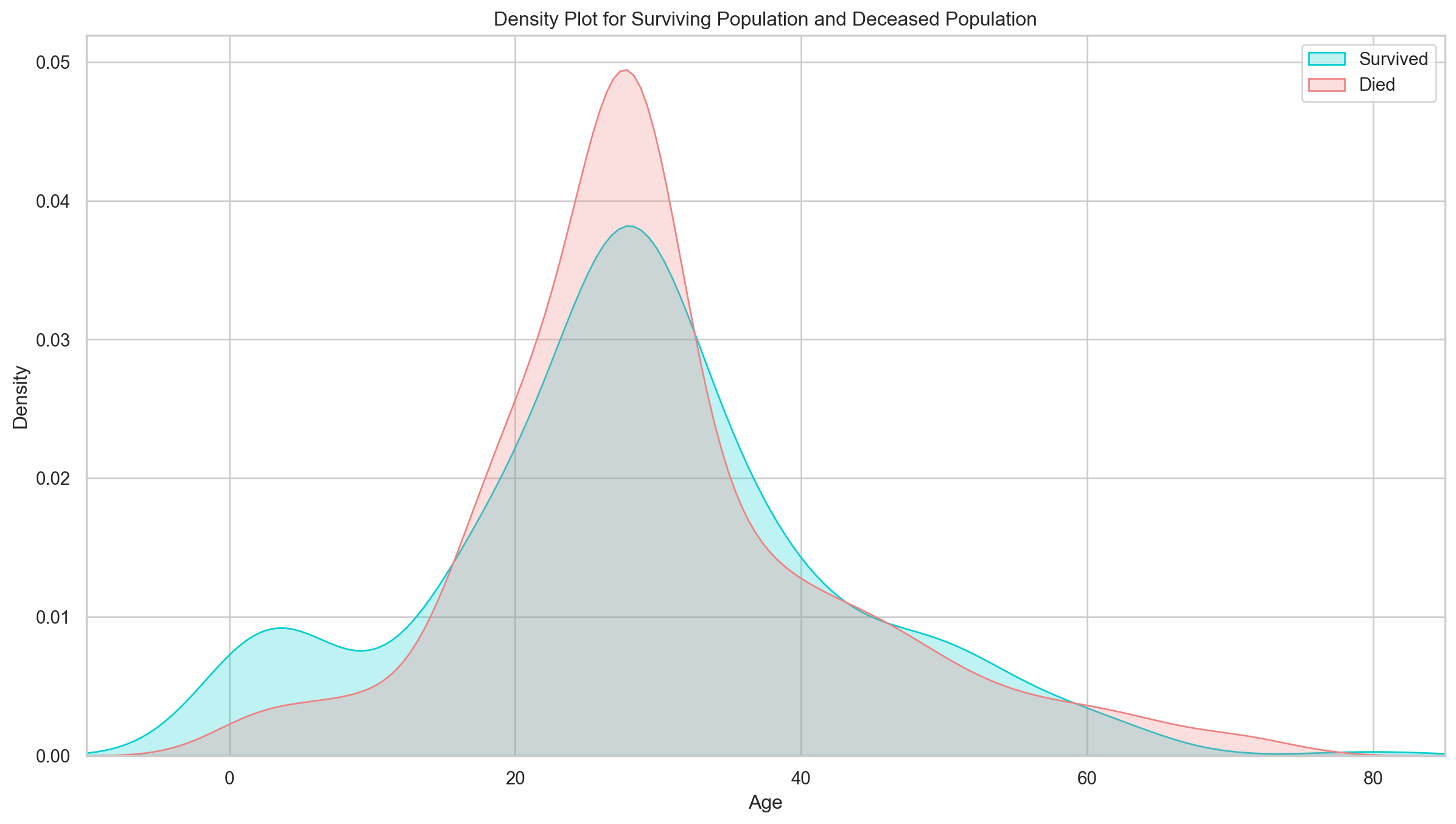
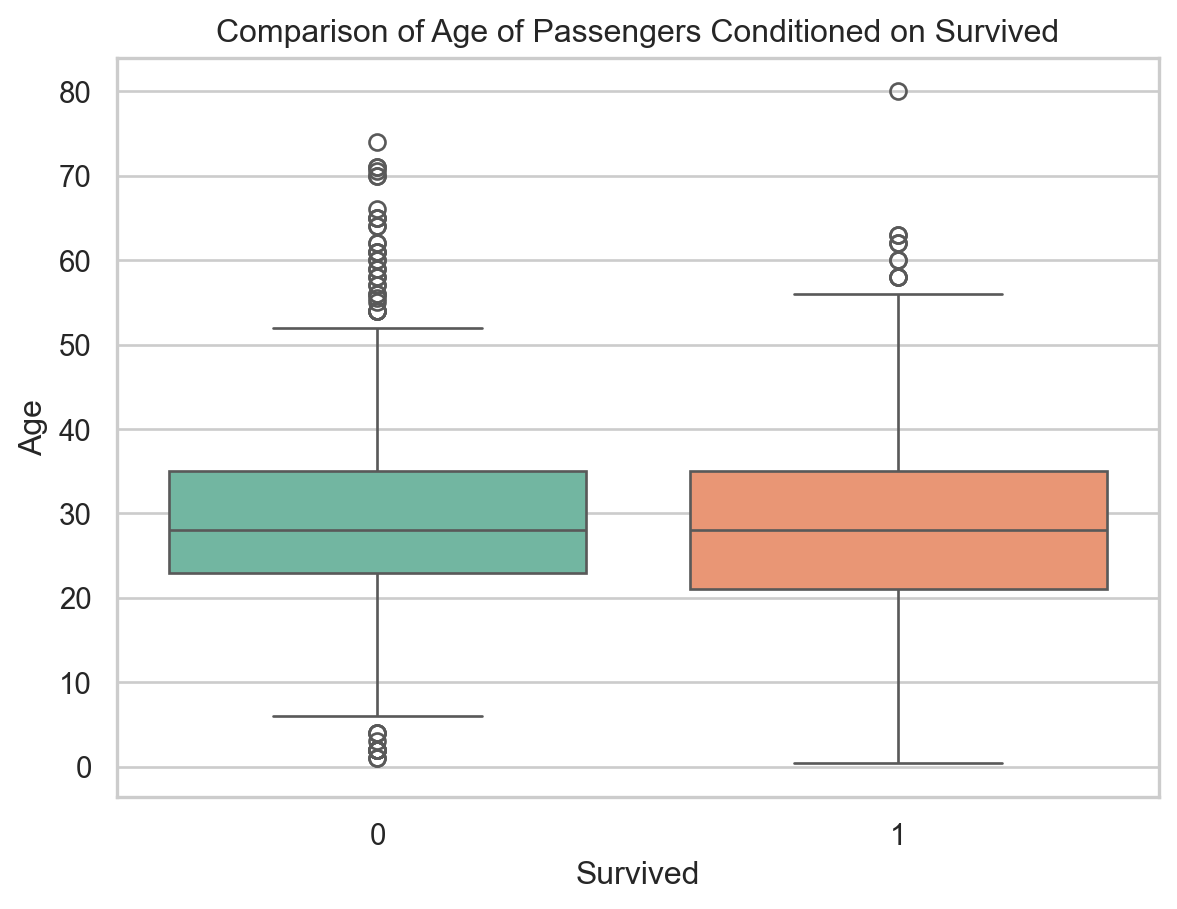
The age distribution for survivors and deceased is actually very similar. One notable difference is that, of the survivors, a larger proportion were children. The passengers evidently made an attempt to save children by giving them a place on the life rafts.

avg_age = final_train.groupby(['Survived']) ['Age'].mean()
avg_age.to_frame().reset_index()
Survived Age
0 0 30.028233
1 1 28.291433
sns.boxplot(data = final_train, x  = 'Survived', y = 'Age', palette='Set2')
plt.title("Comparison of Age of Passengers Conditioned on Survived")
plt.show()

# Creating a Dummy Variable IsMinor
final_train['IsMinor'] = np.where(final_train['Age'] <= 16, 1, 0)
final_test['IsMinor'] = np.where(final_test['Age'] <= 16, 1, 0)

6.2 Exploration of Fare Variable

train_df.groupby(['Survived']) ['Fare'].mean().to_frame().reset_index()
Survived Fare
0 0 22.117887
1 1 48.395408
sns.boxplot(data = final_train, x = 'Survived', y = 'Fare', palette='Set2')
plt.ylim(0, 100)
plt.title('Comparison of Fare of Passengers Conditioned on Survived')
plt.show()

plt.figure(figsize=(15,8))
ax = sns.kdeplot(final_train['Fare'][final_train.Survived == 1],shade=True, color='darkturquoise')
sns.kdeplot(final_train['Fare'][final_train.Survived==0], shade=True, color='lightcoral')
ax.legend(['Survived', 'Died'])
ax.set(xlabel= 'Fare')
plt.xlim(-20,200)
plt.title('Density Plot of Fare for Surviving Population and Deceased Population')
plt.show()

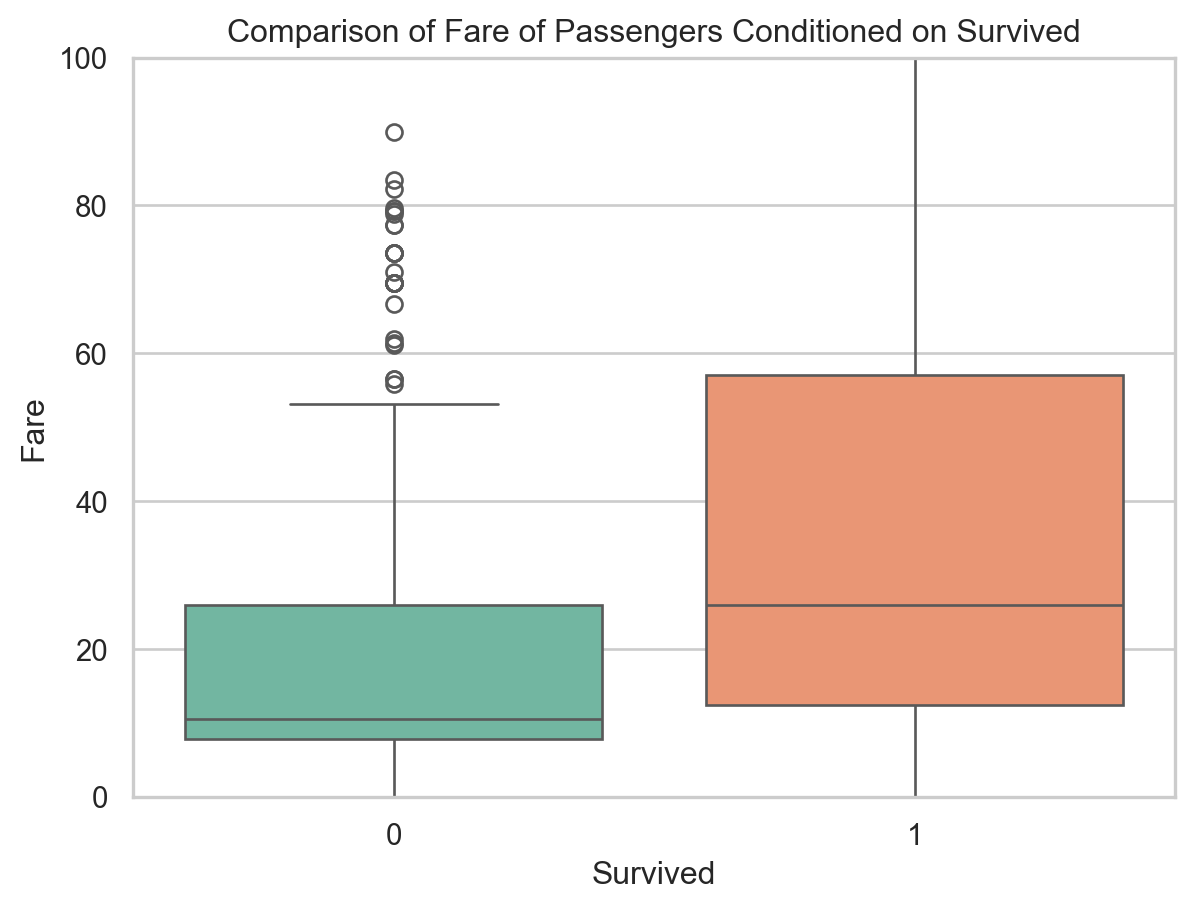
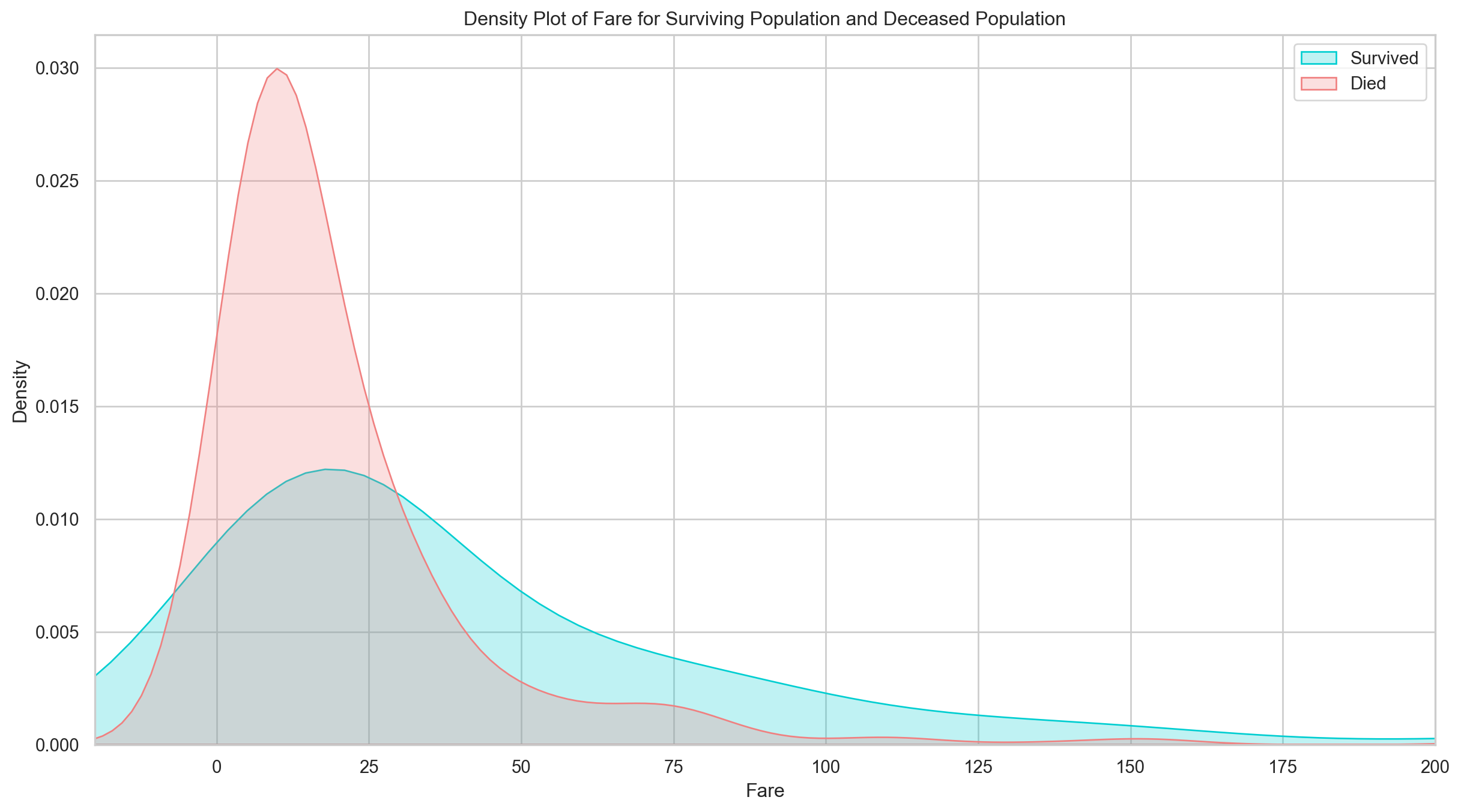
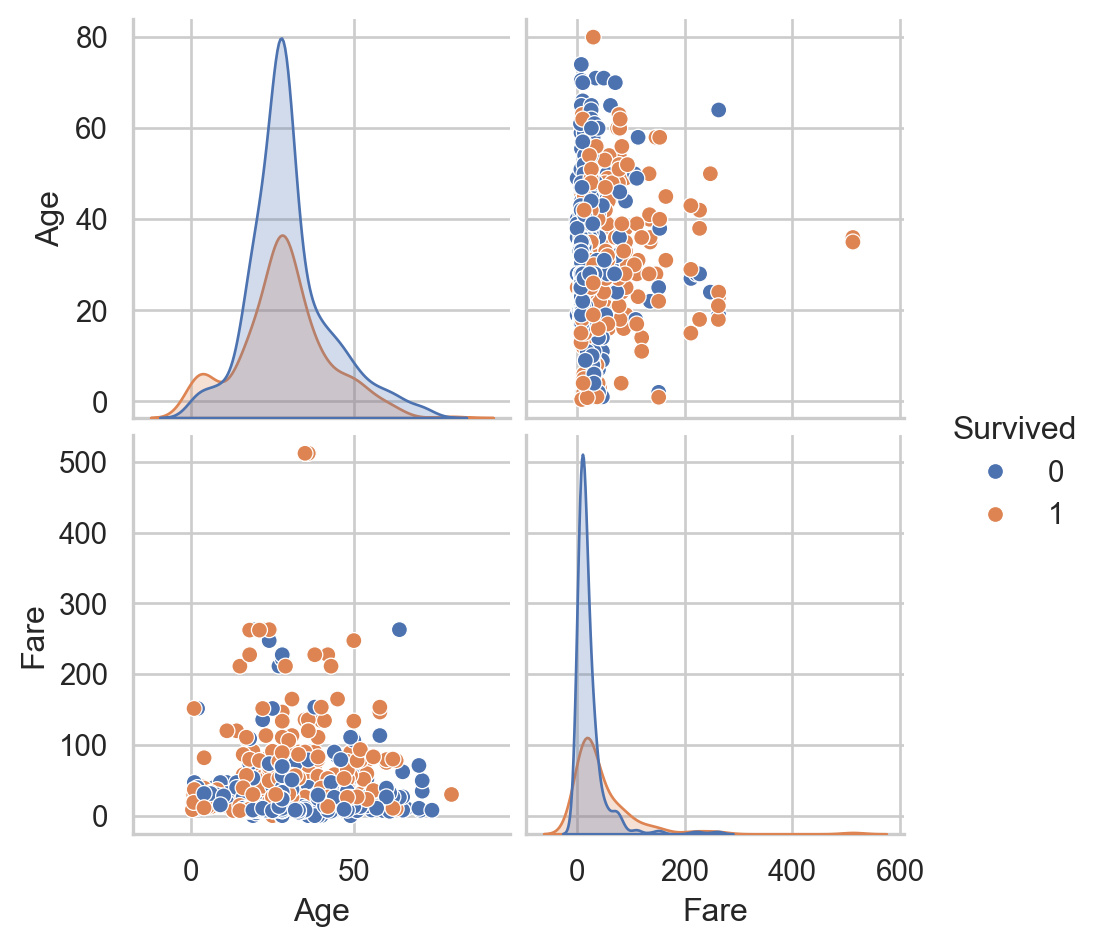
As the distributions are clearly different for the fares of survivors vs. deceased, it’s likely that this would be a significant predictor in our final model. Passengers who paid lower fare appear to have been less likely to survive. This is probably strongly correlated with Passenger Class, which we’ll look at next.

# Pair Plot of two continuous variables (Age and Fare)
plt.figure(figsize=(15,8))
sns.pairplot(data=train_data, hue='Survived', vars= ['Age', 'Fare'])
plt.show()
<Figure size 1440x768 with 0 Axes>

6.3 Exploration of PClass Variable

sns.barplot(data = train_df, x = 'Pclass', y = 'Survived', color='darkturquoise')
plt.show()

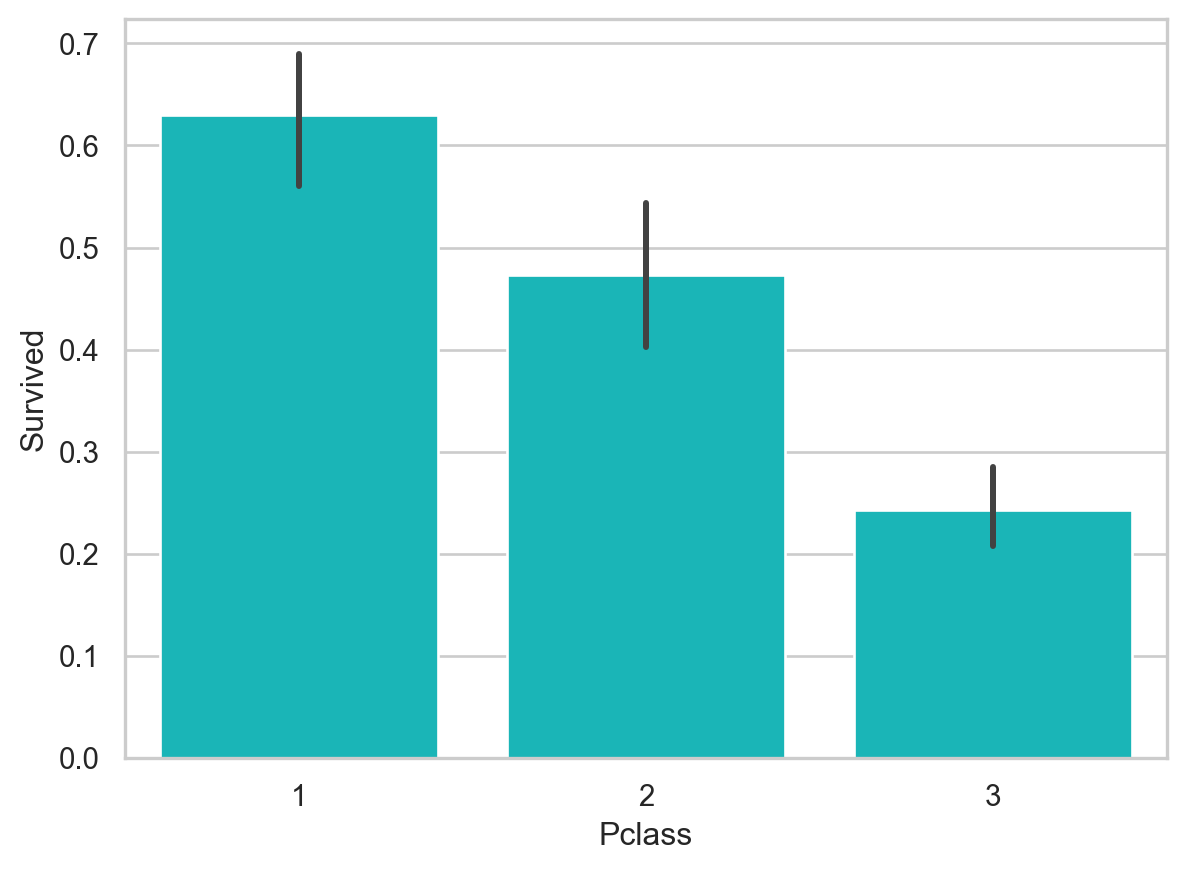
As expected, first class passengers were more likely to survive.

6.4 Exploration of Embarked Variable

sns.barplot(x = 'Embarked', y = 'Survived', data=train_df, color="teal")
plt.show()

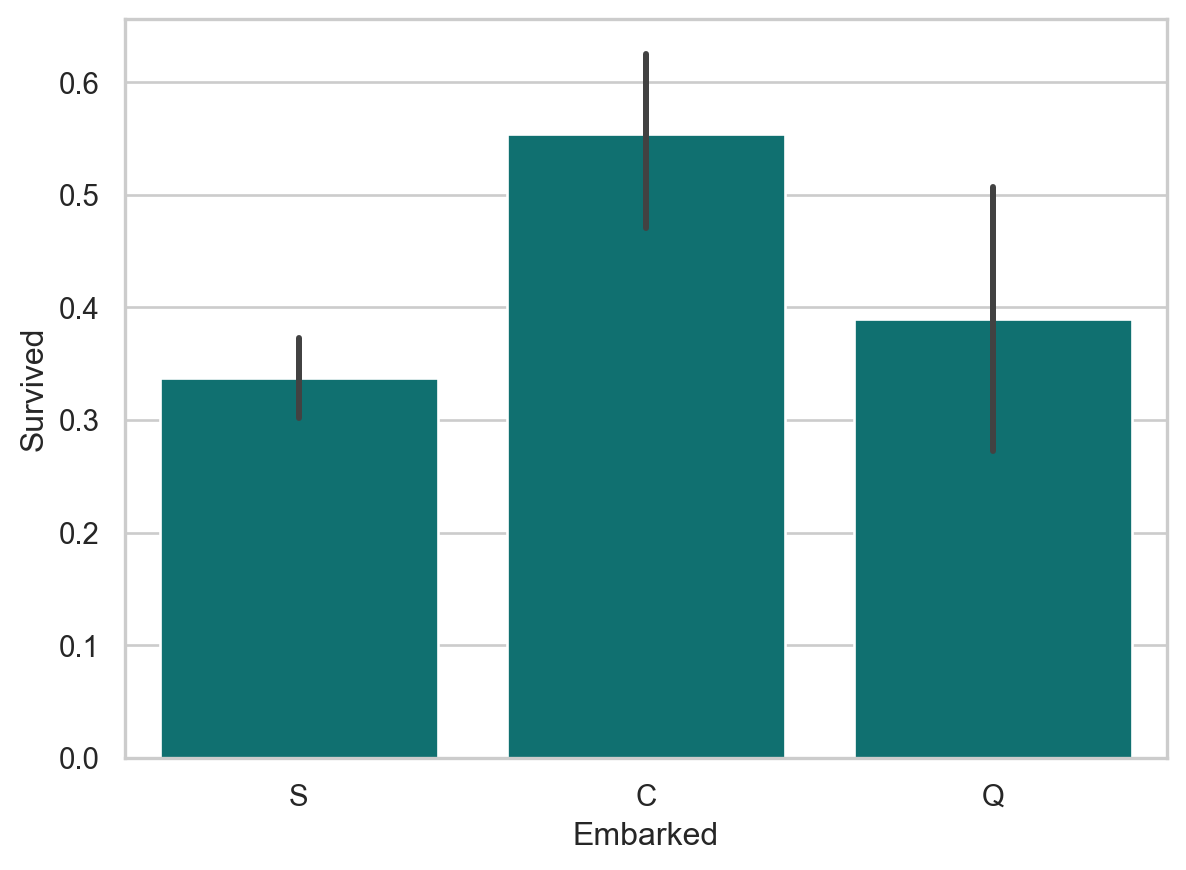
Passengers who boarded in Cherbourg, France, appear to have the highest survival rate. Passengers who boarded in Southhampton were marginally less likely to survive than those who boarded in Queenstown. This is probably related to passenger class, or maybe even the order of room assignments (e.g. maybe earlier passengers were more likely to have rooms closer to deck). It’s also worth noting the size of the whiskers in these plots. Because the number of passengers who boarded at Southhampton was highest, the confidence around the survival rate is the highest. The whisker of the Queenstown plot includes the Southhampton average, as well as the lower bound of its whisker. It’s possible that Queenstown passengers were equally, or even more, ill-fated than their Southhampton counterparts.

6.5 Exploration of TravelAlone Variable

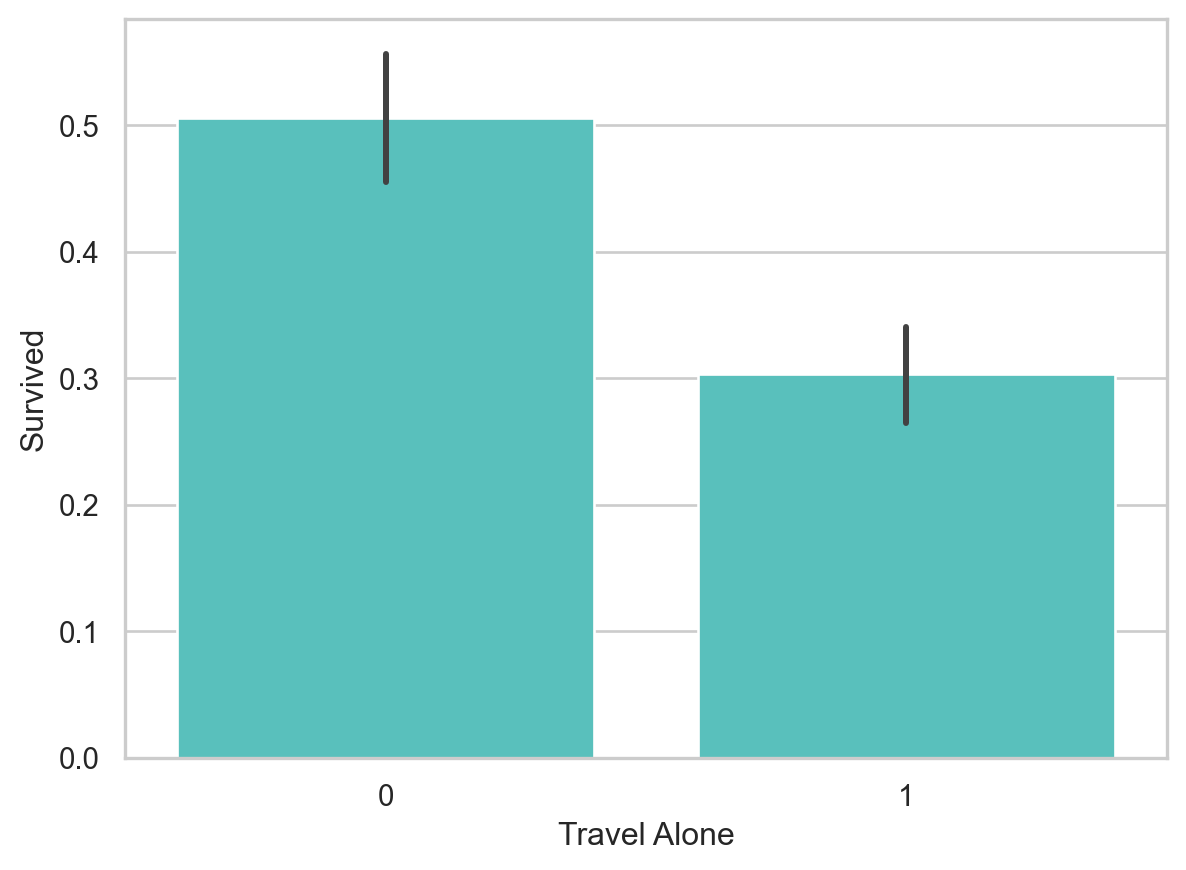
sns.barplot(x = 'TravelAlone', y = 'Survived', data=final_train, color="mediumturquoise")
plt.xlabel('Travel Alone')
plt.show()

Individuals traveling without family were more likely to die in the disaster than those with family aboard. Given the era, it’s likely that individuals traveling alone were likely male.

6.6 Exploration of Gender Variable

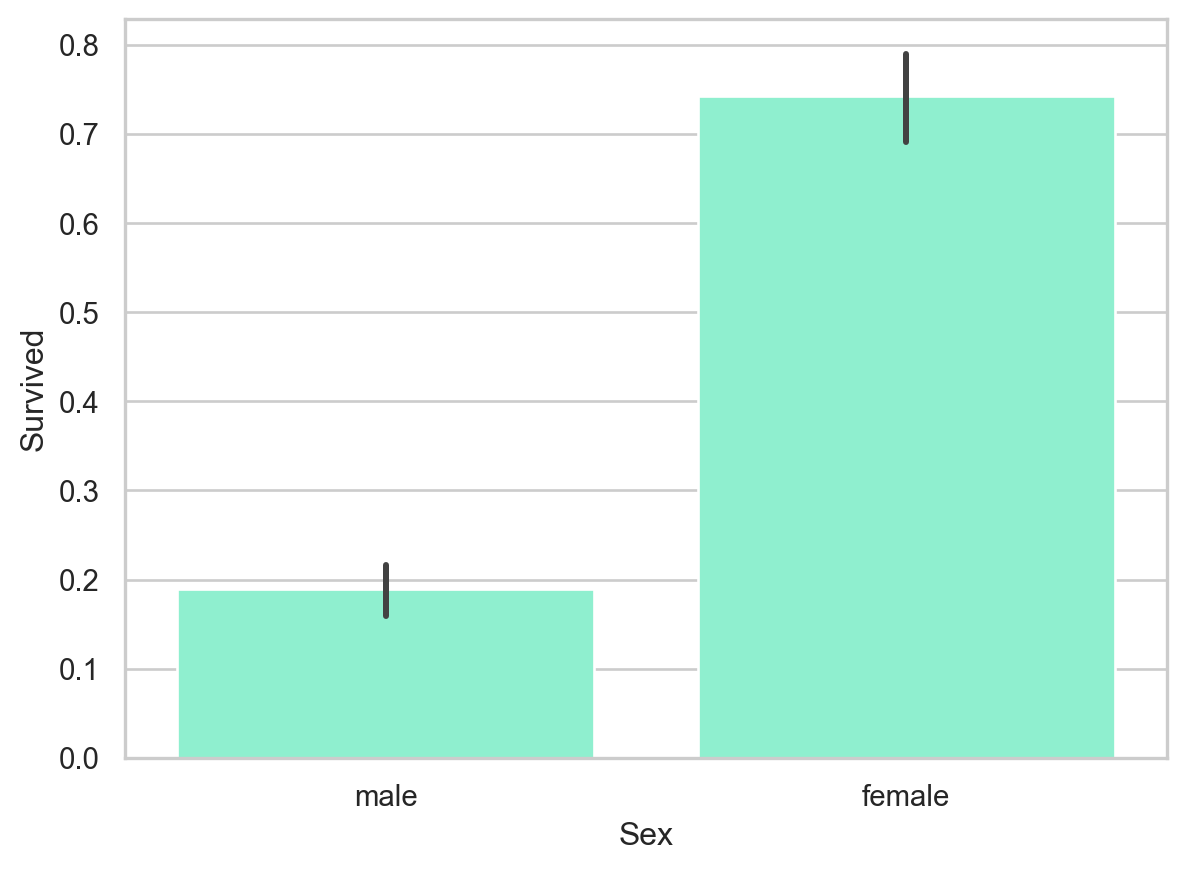
sns.barplot(x = 'Sex', y = 'Survived', data=train_df, color="aquamarine")
plt.show()

6.7 Chi-square Test of Independence

6.7.1 Chi-square Test of Independence betweeen Survived and Sex

pd.crosstab(train_df['Survived'], train_df['Sex'])
Sex female male
Survived
0 81 468
1 233 109
# Importing scipy package 
from scipy import stats
stats.chi2_contingency(pd.crosstab(train_df['Survived'], train_df['Sex']))
Chi2ContingencyResult(statistic=np.float64(260.71702016732104), pvalue=np.float64(1.1973570627755645e-58), dof=1, expected_freq=array([[193.47474747, 355.52525253],
       [120.52525253, 221.47474747]]))
chi2_stat, p, dof, expected = stats.chi2_contingency(pd.crosstab(train_df['Survived'], train_df['Sex']))
print(f"chi2 statistic:     {chi2_stat:.5g}")
print(f"p-value:            {p:.5g}")
print(f"degrees of freedom: {dof}")
print("expected frequencies:\n",expected)
chi2 statistic:     260.72
p-value:            1.1974e-58
degrees of freedom: 1
expected frequencies:
 [[193.47474747 355.52525253]
 [120.52525253 221.47474747]]

6.7.2 Chi-square Test of Independence betweeen Survived and Pclass

chi2_stat_2, p_2, dof_2, expected_2 = stats.chi2_contingency(pd.crosstab(train_df['Survived'], train_df['Pclass']))
print(f"chi2 statistic:     {chi2_stat_2:.5g}")
print(f"p-value:            {p_2:.5g}")
print(f"degrees of freedom: {dof_2}")
print("expected frequencies:\n",expected_2)
chi2 statistic:     102.89
p-value:            4.5493e-23
degrees of freedom: 2
expected frequencies:
 [[133.09090909 113.37373737 302.53535354]
 [ 82.90909091  70.62626263 188.46464646]]

6.8 Post Hoc Analysis of Pclass

The explanation of Post Hoc analysis is given in this link.

pclass_cross = pd.crosstab(train_df['Survived'], train_df['Pclass'])
pclass_cross
Pclass 1 2 3
Survived
0 80 97 372
1 136 87 119
import gc
from itertools import combinations
import scipy.stats
import statsmodels.stats.multicomp as multi
from statsmodels.stats.multitest import multipletests
p_vals_chi = []
pairs_of_class = list(combinations(train_df['Pclass'].unique(),2))

for each_pair in pairs_of_class:
    each_df = train_df[(train_df['Pclass']==each_pair[0]) | (train_df['Pclass']==each_pair[1])]
    p_vals_chi.append(\
          scipy.stats.chi2_contingency(
            pd.crosstab(each_df['Survived'], each_df['Pclass']))[1]
         )
#Results of Bonferroni Adjustment
bonferroni_results = pd.DataFrame(columns=['pair of class',\
                                           'original p value',\
                                           'corrected p value',\
                                           'Reject Null?'])

bonferroni_results['pair of class'] = pairs_of_class
bonferroni_results['original p value'] = p_vals_chi

#Perform Bonferroni on the p-values and get the reject/fail to reject Null Hypothesis result.
multi_test_results_bonferroni = multipletests(p_vals_chi, method='bonferroni')

bonferroni_results['corrected p value'] = multi_test_results_bonferroni[1]
bonferroni_results['Reject Null?'] = multi_test_results_bonferroni[0]
bonferroni_results.head()
pair of class original p value corrected p value Reject Null?
0 (3, 1) 1.212338e-22 3.637013e-22 True
1 (3, 2) 1.224965e-08 3.674894e-08 True
2 (1, 2) 2.319805e-03 6.959414e-03 True

6.9 Post Hoc Analysis of Embarked

# Write code Here 
p_vals_chi_embark = []
pairs_of_embark = list(combinations(train_data['Embarked'].unique(),2))

for each_pair in pairs_of_embark:
    each_df = train_data[(train_data['Embarked']==each_pair[0]) | (train_data['Embarked']==each_pair[1])]
    p_vals_chi_embark.append(\
          scipy.stats.chi2_contingency(
            pd.crosstab(each_df['Survived'], each_df['Embarked']))[1]
         )
#Write code Here
#Results of Bonferroni Adjustment
bonferroni_results = pd.DataFrame(columns=['pair of embark',\
                                           'original p value',\
                                           'corrected p value',\
                                           'Reject Null?'])

bonferroni_results['pair of embark'] = pairs_of_embark
bonferroni_results['original p value'] = p_vals_chi_embark

#Perform Bonferroni on the p-values and get the reject/fail to reject Null Hypothesis result.
multi_test_results_bonferroni_embark = multipletests(p_vals_chi_embark, method='bonferroni')

bonferroni_results['corrected p value'] = multi_test_results_bonferroni_embark[1]
bonferroni_results['Reject Null?'] = multi_test_results_bonferroni_embark[0]
bonferroni_results.head()
pair of embark original p value corrected p value Reject Null?
0 (S, C) 5.537903e-07 0.000002 True
1 (S, Q) 4.493936e-01 1.000000 False
2 (C, Q) 2.475540e-02 0.074266 False

7 Logistic Regression & Results

7.1 Feature Selection

7.1.1 Recursive Feature Selection (RFE)

Given an external estimator that assigns weights to features, recursive feature elimination (RFE) is to select features by recursively considering smaller and smaller sets of features. First, the estimator is trained on the initial set of features and the importance of each feature is obtained either through a coef_ attribute or through a feature_importances_ attribute. Then, the least important features are pruned from current set of features.That procedure is recursively repeated on the pruned set until the desired number of features to select is eventually reached.

# Our all training dataset 
train_df
train_data # impute missing values 
training # create the dummies 
final_train
Survived Age Fare TravelAlone Pclass_1 Pclass_2 Pclass_3 Embarked_C Embarked_Q Embarked_S Sex_male IsMinor
0 0 22.0 7.2500 0 False False True False False True True 0
1 1 38.0 71.2833 0 True False False True False False False 0
2 1 26.0 7.9250 1 False False True False False True False 0
3 1 35.0 53.1000 0 True False False False False True False 0
4 0 35.0 8.0500 1 False False True False False True True 0
... ... ... ... ... ... ... ... ... ... ... ... ...
886 0 27.0 13.0000 1 False True False False False True True 0
887 1 19.0 30.0000 1 True False False False False True False 0
888 0 28.0 23.4500 0 False False True False False True False 0
889 1 26.0 30.0000 1 True False False True False False True 0
890 0 32.0 7.7500 1 False False True False True False True 0

891 rows × 12 columns

cols = ['Age', 'Fare', 'TravelAlone','Pclass_1','Pclass_2','Embarked_C','Embarked_Q','Sex_male','IsMinor']
X = final_train[cols] # features vector
y = final_train['Survived'] # Target vector 
from sklearn.linear_model import LogisticRegression
from sklearn.feature_selection import RFE
from sklearn.feature_selection import RFECV
# Build the model 
model = LogisticRegression()
# Create the RFE model 
rfe = RFE(estimator=model, n_features_to_select=8)
rfe = rfe.fit(X ,y)
dir(rfe)
['__abstractmethods__',
 '__annotations__',
 '__class__',
 '__delattr__',
 '__dict__',
 '__dir__',
 '__doc__',
 '__eq__',
 '__firstlineno__',
 '__format__',
 '__ge__',
 '__getattribute__',
 '__getstate__',
 '__gt__',
 '__hash__',
 '__init__',
 '__init_subclass__',
 '__le__',
 '__lt__',
 '__module__',
 '__ne__',
 '__new__',
 '__reduce__',
 '__reduce_ex__',
 '__repr__',
 '__setattr__',
 '__setstate__',
 '__sizeof__',
 '__sklearn_clone__',
 '__sklearn_tags__',
 '__static_attributes__',
 '__str__',
 '__subclasshook__',
 '__weakref__',
 '_abc_impl',
 '_build_request_for_signature',
 '_check_feature_names',
 '_check_n_features',
 '_doc_link_module',
 '_doc_link_template',
 '_doc_link_url_param_generator',
 '_estimator_type',
 '_fit',
 '_get_default_requests',
 '_get_doc_link',
 '_get_metadata_request',
 '_get_param_names',
 '_get_support_mask',
 '_get_tags',
 '_more_tags',
 '_parameter_constraints',
 '_repr_html_',
 '_repr_html_inner',
 '_repr_mimebundle_',
 '_sklearn_auto_wrap_output_keys',
 '_transform',
 '_validate_data',
 '_validate_params',
 'classes_',
 'decision_function',
 'estimator',
 'estimator_',
 'feature_names_in_',
 'fit',
 'fit_transform',
 'get_feature_names_out',
 'get_metadata_routing',
 'get_params',
 'get_support',
 'importance_getter',
 'inverse_transform',
 'n_features_',
 'n_features_in_',
 'n_features_to_select',
 'predict',
 'predict_log_proba',
 'predict_proba',
 'ranking_',
 'score',
 'set_output',
 'set_params',
 'step',
 'support_',
 'transform',
 'verbose']
# summarize the selection of the attributes
print('Selected features: %s' % list(X.columns[rfe.support_]))
Selected features: ['Age', 'TravelAlone', 'Pclass_1', 'Pclass_2', 'Embarked_C', 'Embarked_Q', 'Sex_male', 'IsMinor']
# Getting the Regression Results 
import statsmodels.api as sm
logit_model = sm.Logit(y,X.astype(float))
result = logit_model.fit()
print(result.summary2())
Optimization terminated successfully.
         Current function value: 0.448075
         Iterations 6
                         Results: Logit
=================================================================
Model:              Logit            Method:           MLE       
Dependent Variable: Survived         Pseudo R-squared: 0.327     
Date:               2025-02-12 22:24 AIC:              816.4704  
No. Observations:   891              BIC:              859.6015  
Df Model:           8                Log-Likelihood:   -399.24   
Df Residuals:       882              LL-Null:          -593.33   
Converged:          1.0000           LLR p-value:      6.3002e-79
No. Iterations:     6.0000           Scale:            1.0000    
------------------------------------------------------------------
              Coef.   Std.Err.     z      P>|z|    [0.025   0.975]
------------------------------------------------------------------
Age          -0.0121    0.0057   -2.1381  0.0325  -0.0232  -0.0010
Fare          0.0015    0.0022    0.6878  0.4916  -0.0028   0.0058
TravelAlone   0.2803    0.1936    1.4475  0.1477  -0.0992   0.6597
Pclass_1      2.1646    0.2838    7.6272  0.0000   1.6083   2.7208
Pclass_2      1.3948    0.2309    6.0399  0.0000   0.9422   1.8473
Embarked_C    0.6014    0.2332    2.5790  0.0099   0.1443   1.0584
Embarked_Q    0.6366    0.3139    2.0282  0.0425   0.0214   1.2517
Sex_male     -2.5527    0.1955  -13.0567  0.0000  -2.9359  -2.1695
IsMinor       0.9987    0.2737    3.6488  0.0003   0.4623   1.5352
=================================================================
cols2 = ['Age',  'TravelAlone','Pclass_1','Pclass_2','Embarked_C','Embarked_Q','Sex_male','IsMinor']
X_alt = final_train[cols2] # features vector
logit_model2 = sm.Logit(y,sm.add_constant(X_alt.astype(float)))
result2 = logit_model2.fit()
print(result2.summary2())
Optimization terminated successfully.
         Current function value: 0.446363
         Iterations 6
                         Results: Logit
=================================================================
Model:              Logit            Method:           MLE       
Dependent Variable: Survived         Pseudo R-squared: 0.330     
Date:               2025-02-12 22:24 AIC:              813.4192  
No. Observations:   891              BIC:              856.5503  
Df Model:           8                Log-Likelihood:   -397.71   
Df Residuals:       882              LL-Null:          -593.33   
Converged:          1.0000           LLR p-value:      1.4027e-79
No. Iterations:     6.0000           Scale:            1.0000    
------------------------------------------------------------------
              Coef.   Std.Err.     z      P>|z|    [0.025   0.975]
------------------------------------------------------------------
const         0.6181    0.3319    1.8623  0.0626  -0.0324   1.2686
Age          -0.0245    0.0091   -2.7055  0.0068  -0.0423  -0.0068
TravelAlone   0.1475    0.1973    0.7476  0.4547  -0.2392   0.5343
Pclass_1      2.2826    0.2546    8.9666  0.0000   1.7837   2.7815
Pclass_2      1.3380    0.2340    5.7178  0.0000   0.8793   1.7966
Embarked_C    0.5518    0.2351    2.3471  0.0189   0.0910   1.0126
Embarked_Q    0.5323    0.3217    1.6548  0.0980  -0.0982   1.1627
Sex_male     -2.6141    0.1973  -13.2482  0.0000  -3.0009  -2.2274
IsMinor       0.5957    0.3560    1.6735  0.0942  -0.1020   1.2935
=================================================================
from stargazer.stargazer import Stargazer
titanic_logit = Stargazer([result, result2])
titanic_logit
Dependent variable: Survived
(1)(2)
Age-0.012**-0.025***
(0.006)(0.009)
Embarked_C0.601***0.552**
(0.233)(0.235)
Embarked_Q0.637**0.532*
(0.314)(0.322)
Fare0.002
(0.002)
IsMinor0.999***0.596*
(0.274)(0.356)
Pclass_12.165***2.283***
(0.284)(0.255)
Pclass_21.395***1.338***
(0.231)(0.234)
Sex_male-2.553***-2.614***
(0.196)(0.197)
TravelAlone0.2800.148
(0.194)(0.197)
const0.618*
(0.332)
Observations891891
Pseudo R20.3270.330
Note:*p<0.1; **p<0.05; ***p<0.01
# Interpreting the coefficients, which are the log odds; therefore, we need to convert them into odds ratio. 
np.exp(-2.5527)
np.float64(0.0778711298546485)
np.exp(result.params) # Getting the Odds Ratio of all Features 
Age            0.987957
Fare           1.001519
TravelAlone    1.323475
Pclass_1       8.710827
Pclass_2       4.033966
Embarked_C     1.824624
Embarked_Q     1.889992
Sex_male       0.077872
IsMinor        2.714860
dtype: float64

7.1.2 Feature Ranking with Recursive Feature Elimination and Cross-validation (RFECV)

RFECV performs RFE in a cross-validation loop to find the optimal number or the best number of features. Hereafter a recursive feature elimination applied on logistic regression with automatic tuning of the number of features selected with cross-validation

# Create the RFE object and compute a cross-validated score.
# The "accuracy" scoring is proportional to the number of correct classifications
rfecv = RFECV(estimator=LogisticRegression(max_iter = 5000), step=1, cv=10, scoring='accuracy')
rfecv.fit(X, y)
for x in dir(rfecv):
  print(x)
_RFECV__metadata_request__fit
__abstractmethods__
__annotations__
__class__
__delattr__
__dict__
__dir__
__doc__
__eq__
__firstlineno__
__format__
__ge__
__getattribute__
__getstate__
__gt__
__hash__
__init__
__init_subclass__
__le__
__lt__
__module__
__ne__
__new__
__reduce__
__reduce_ex__
__repr__
__setattr__
__setstate__
__sizeof__
__sklearn_clone__
__sklearn_tags__
__static_attributes__
__str__
__subclasshook__
__weakref__
_abc_impl
_build_request_for_signature
_check_feature_names
_check_n_features
_doc_link_module
_doc_link_template
_doc_link_url_param_generator
_estimator_type
_fit
_get_default_requests
_get_doc_link
_get_metadata_request
_get_param_names
_get_scorer
_get_support_mask
_get_tags
_more_tags
_parameter_constraints
_repr_html_
_repr_html_inner
_repr_mimebundle_
_sklearn_auto_wrap_output_keys
_transform
_validate_data
_validate_params
classes_
cv
cv_results_
decision_function
estimator
estimator_
feature_names_in_
fit
fit_transform
get_feature_names_out
get_metadata_routing
get_params
get_support
importance_getter
inverse_transform
min_features_to_select
n_features_
n_features_in_
n_jobs
predict
predict_log_proba
predict_proba
ranking_
score
scoring
set_output
set_params
step
support_
transform
verbose
# To get the accuracy
rfecv.cv_results_
{'mean_test_score': array([0.78672909, 0.78672909, 0.78672909, 0.79009988, 0.78560549,
        0.78561798, 0.78790262, 0.79574282, 0.79463171]),
 'std_test_score': array([0.02859935, 0.02859935, 0.02859935, 0.02989151, 0.02604354,
        0.02546772, 0.03370206, 0.02689652, 0.02691683]),
 'split0_test_score': array([0.81111111, 0.81111111, 0.81111111, 0.81111111, 0.81111111,
        0.8       , 0.76666667, 0.78888889, 0.77777778]),
 'split1_test_score': array([0.79775281, 0.79775281, 0.79775281, 0.79775281, 0.76404494,
        0.75280899, 0.76404494, 0.79775281, 0.79775281]),
 'split2_test_score': array([0.76404494, 0.76404494, 0.76404494, 0.76404494, 0.76404494,
        0.78651685, 0.7752809 , 0.7752809 , 0.7752809 ]),
 'split3_test_score': array([0.84269663, 0.84269663, 0.84269663, 0.85393258, 0.83146067,
        0.83146067, 0.84269663, 0.85393258, 0.85393258]),
 'split4_test_score': array([0.79775281, 0.79775281, 0.79775281, 0.79775281, 0.79775281,
        0.79775281, 0.79775281, 0.7752809 , 0.7752809 ]),
 'split5_test_score': array([0.7752809 , 0.7752809 , 0.7752809 , 0.78651685, 0.78651685,
        0.78651685, 0.78651685, 0.78651685, 0.7752809 ]),
 'split6_test_score': array([0.76404494, 0.76404494, 0.76404494, 0.76404494, 0.76404494,
        0.76404494, 0.76404494, 0.76404494, 0.7752809 ]),
 'split7_test_score': array([0.74157303, 0.74157303, 0.74157303, 0.74157303, 0.74157303,
        0.74157303, 0.74157303, 0.7752809 , 0.7752809 ]),
 'split8_test_score': array([0.80898876, 0.80898876, 0.80898876, 0.80898876, 0.80898876,
        0.80898876, 0.85393258, 0.83146067, 0.83146067]),
 'split9_test_score': array([0.76404494, 0.76404494, 0.76404494, 0.7752809 , 0.78651685,
        0.78651685, 0.78651685, 0.80898876, 0.80898876]),
 'n_features': array([1, 2, 3, 4, 5, 6, 7, 8, 9])}
type(rfecv.cv_results_)
dict
rfecv.cv_results_
{'mean_test_score': array([0.78672909, 0.78672909, 0.78672909, 0.79009988, 0.78560549,
        0.78561798, 0.78790262, 0.79574282, 0.79463171]),
 'std_test_score': array([0.02859935, 0.02859935, 0.02859935, 0.02989151, 0.02604354,
        0.02546772, 0.03370206, 0.02689652, 0.02691683]),
 'split0_test_score': array([0.81111111, 0.81111111, 0.81111111, 0.81111111, 0.81111111,
        0.8       , 0.76666667, 0.78888889, 0.77777778]),
 'split1_test_score': array([0.79775281, 0.79775281, 0.79775281, 0.79775281, 0.76404494,
        0.75280899, 0.76404494, 0.79775281, 0.79775281]),
 'split2_test_score': array([0.76404494, 0.76404494, 0.76404494, 0.76404494, 0.76404494,
        0.78651685, 0.7752809 , 0.7752809 , 0.7752809 ]),
 'split3_test_score': array([0.84269663, 0.84269663, 0.84269663, 0.85393258, 0.83146067,
        0.83146067, 0.84269663, 0.85393258, 0.85393258]),
 'split4_test_score': array([0.79775281, 0.79775281, 0.79775281, 0.79775281, 0.79775281,
        0.79775281, 0.79775281, 0.7752809 , 0.7752809 ]),
 'split5_test_score': array([0.7752809 , 0.7752809 , 0.7752809 , 0.78651685, 0.78651685,
        0.78651685, 0.78651685, 0.78651685, 0.7752809 ]),
 'split6_test_score': array([0.76404494, 0.76404494, 0.76404494, 0.76404494, 0.76404494,
        0.76404494, 0.76404494, 0.76404494, 0.7752809 ]),
 'split7_test_score': array([0.74157303, 0.74157303, 0.74157303, 0.74157303, 0.74157303,
        0.74157303, 0.74157303, 0.7752809 , 0.7752809 ]),
 'split8_test_score': array([0.80898876, 0.80898876, 0.80898876, 0.80898876, 0.80898876,
        0.80898876, 0.85393258, 0.83146067, 0.83146067]),
 'split9_test_score': array([0.76404494, 0.76404494, 0.76404494, 0.7752809 , 0.78651685,
        0.78651685, 0.78651685, 0.80898876, 0.80898876]),
 'n_features': array([1, 2, 3, 4, 5, 6, 7, 8, 9])}
rfecv.n_features_
np.int64(8)
list(X.columns[rfecv.support_])
['Age',
 'TravelAlone',
 'Pclass_1',
 'Pclass_2',
 'Embarked_C',
 'Embarked_Q',
 'Sex_male',
 'IsMinor']
# To check whether the RFE and RFECV generate the same features
set(list(X.columns[rfecv.support_])) == set(list((X.columns[rfe.support_])))  
True
rfecv.cv_results_.keys()
dict_keys(['mean_test_score', 'std_test_score', 'split0_test_score', 'split1_test_score', 'split2_test_score', 'split3_test_score', 'split4_test_score', 'split5_test_score', 'split6_test_score', 'split7_test_score', 'split8_test_score', 'split9_test_score', 'n_features'])
crossVal_results = rfecv.cv_results_
crossVal_results
del crossVal_results['mean_test_score']
del crossVal_results['std_test_score']
crossVal_results
{'split0_test_score': array([0.81111111, 0.81111111, 0.81111111, 0.81111111, 0.81111111,
        0.8       , 0.76666667, 0.78888889, 0.77777778]),
 'split1_test_score': array([0.79775281, 0.79775281, 0.79775281, 0.79775281, 0.76404494,
        0.75280899, 0.76404494, 0.79775281, 0.79775281]),
 'split2_test_score': array([0.76404494, 0.76404494, 0.76404494, 0.76404494, 0.76404494,
        0.78651685, 0.7752809 , 0.7752809 , 0.7752809 ]),
 'split3_test_score': array([0.84269663, 0.84269663, 0.84269663, 0.85393258, 0.83146067,
        0.83146067, 0.84269663, 0.85393258, 0.85393258]),
 'split4_test_score': array([0.79775281, 0.79775281, 0.79775281, 0.79775281, 0.79775281,
        0.79775281, 0.79775281, 0.7752809 , 0.7752809 ]),
 'split5_test_score': array([0.7752809 , 0.7752809 , 0.7752809 , 0.78651685, 0.78651685,
        0.78651685, 0.78651685, 0.78651685, 0.7752809 ]),
 'split6_test_score': array([0.76404494, 0.76404494, 0.76404494, 0.76404494, 0.76404494,
        0.76404494, 0.76404494, 0.76404494, 0.7752809 ]),
 'split7_test_score': array([0.74157303, 0.74157303, 0.74157303, 0.74157303, 0.74157303,
        0.74157303, 0.74157303, 0.7752809 , 0.7752809 ]),
 'split8_test_score': array([0.80898876, 0.80898876, 0.80898876, 0.80898876, 0.80898876,
        0.80898876, 0.85393258, 0.83146067, 0.83146067]),
 'split9_test_score': array([0.76404494, 0.76404494, 0.76404494, 0.7752809 , 0.78651685,
        0.78651685, 0.78651685, 0.80898876, 0.80898876]),
 'n_features': array([1, 2, 3, 4, 5, 6, 7, 8, 9])}

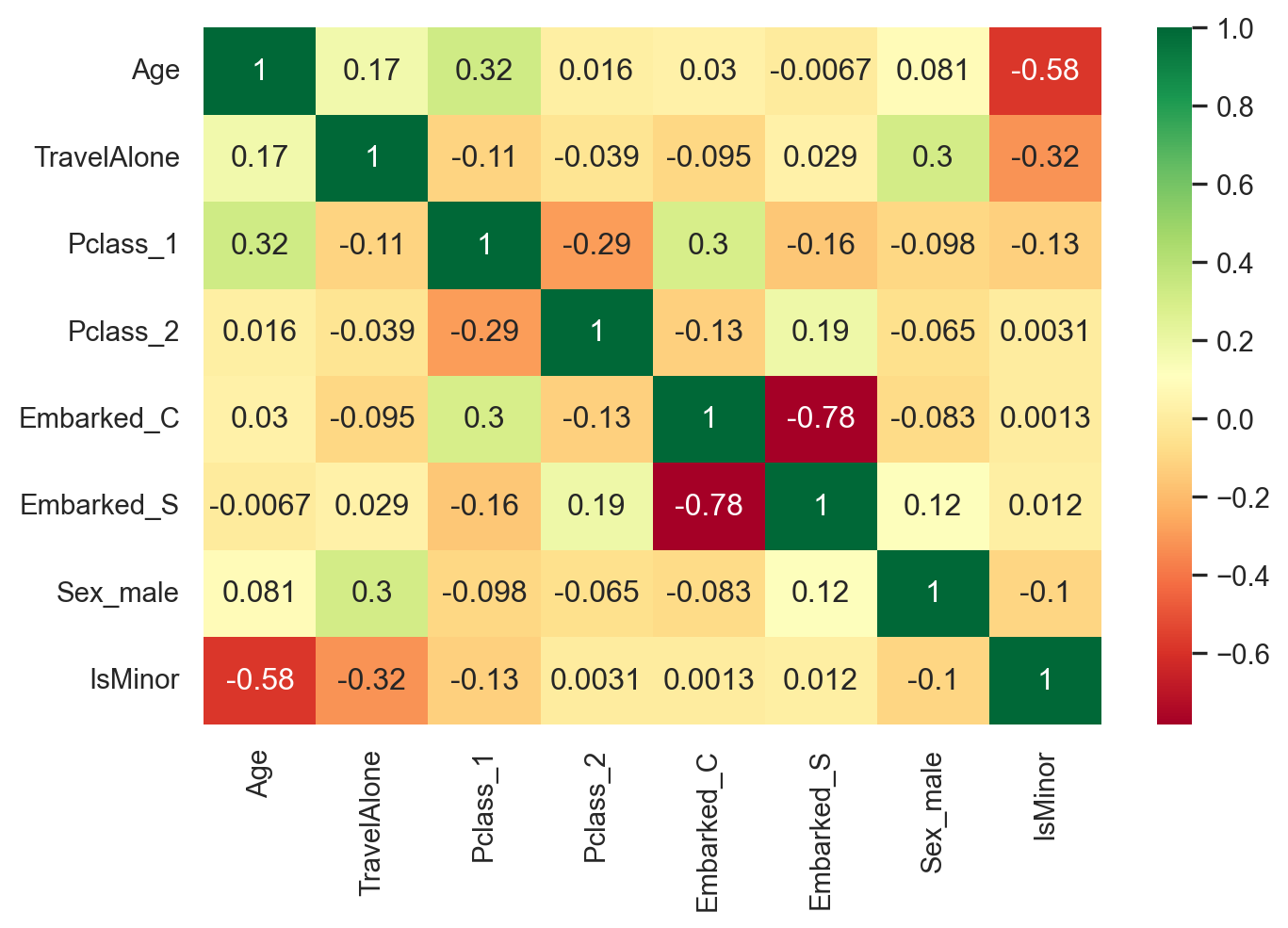
8 Correlation Matrix

Selected_features = ['Age', 'TravelAlone', 'Pclass_1', 'Pclass_2', 'Embarked_C', 
                     'Embarked_S', 'Sex_male', 'IsMinor']
X = final_train[Selected_features] # Recreated features vector 

plt.subplots(figsize=(8, 5))
sns.heatmap(X.corr(), annot=True, cmap="RdYlGn") # for cmap = 'viridis' can also be used.
plt.show()

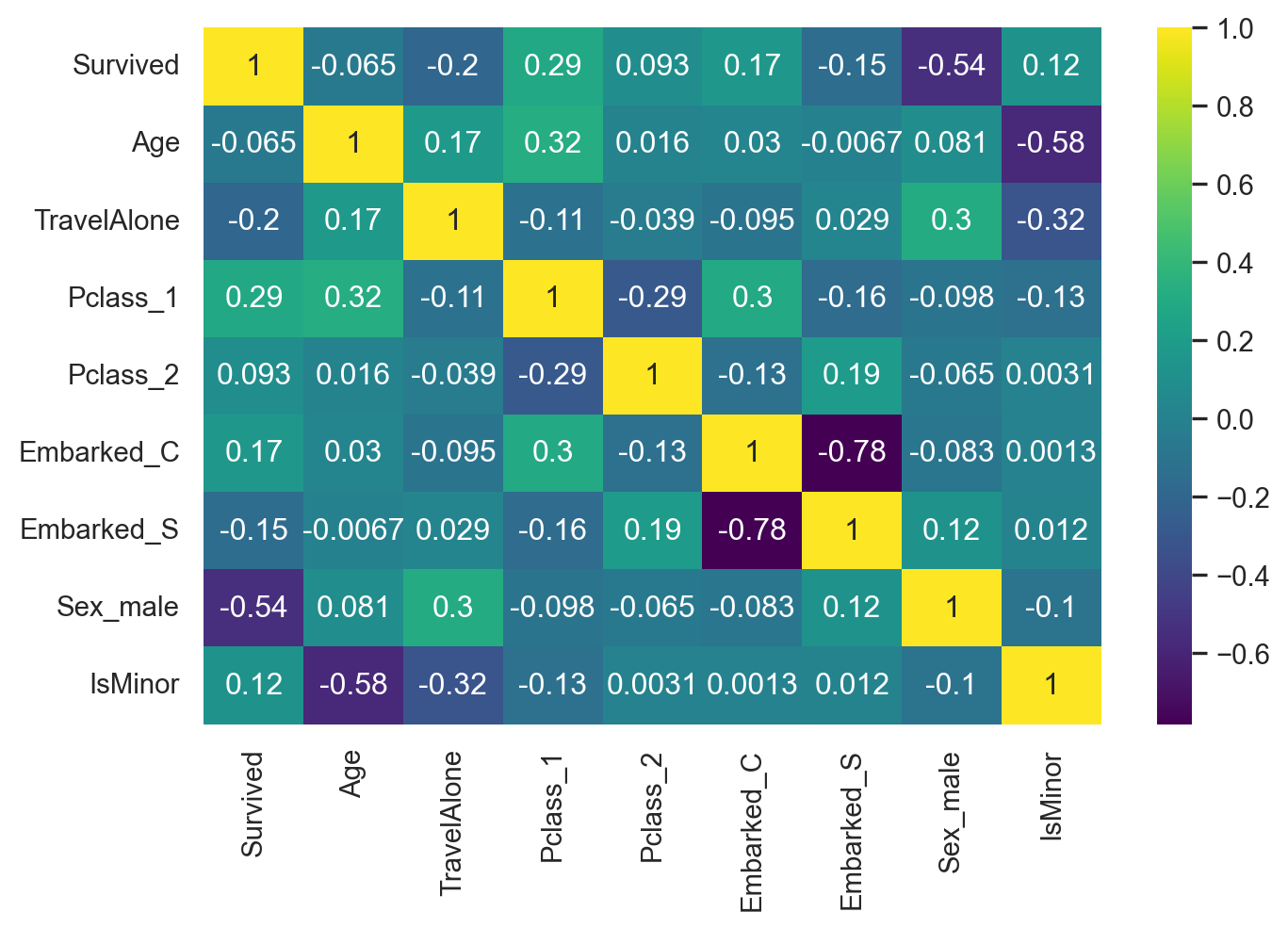
plt.subplots(figsize=(8, 5))
sns.heatmap(final_train[['Survived', 'Age', 'TravelAlone', 'Pclass_1', 'Pclass_2', 'Embarked_C', 'Embarked_S', 'Sex_male', 'IsMinor']].corr(), annot = True, cmap = 'viridis')
plt.show()

9 Model Evaluation Procedures

9.1 Model Evaluation Based on Train/Test Split

from sklearn.linear_model import LogisticRegression
from sklearn.model_selection import train_test_split, cross_val_score
from sklearn.model_selection import cross_validate
from sklearn.preprocessing import StandardScaler
from sklearn.metrics import accuracy_score, classification_report, precision_score, recall_score
from sklearn.metrics import confusion_matrix, precision_recall_curve, roc_curve, auc, log_loss
X = final_train[Selected_features]
y = final_train['Survived']
# use train/test split with different random_state values
# we can change the random_state values that changes the accuracy scores
# the scores change a lot, this is why testing scores is a high-variance estimate
X_train, X_test, y_train, y_test = train_test_split(X, y, test_size=0.2, random_state=5)
# Check classification scores of Logistic Regression
logreg = LogisticRegression()
logreg.fit(X_train, y_train)
y_pred = logreg.predict(X_test) # Prediction actual class
y_pred_proba = logreg.predict_proba(X_test) [:,1]
[fpr, tpr, thr] = roc_curve(y_test, y_pred_proba)
print('Train/Test split results:')
print(logreg.__class__.__name__+" accuracy is %2.3f" % accuracy_score(y_test, y_pred))
print(logreg.__class__.__name__+" log_loss is %2.3f" % log_loss(y_test, y_pred_proba)) 
print(logreg.__class__.__name__+" auc is %2.3f" % auc(fpr, tpr)) 
Train/Test split results:
LogisticRegression accuracy is 0.810
LogisticRegression log_loss is 0.446
LogisticRegression auc is 0.847

9.2 Confusion Matrix

# Confusion Matrix
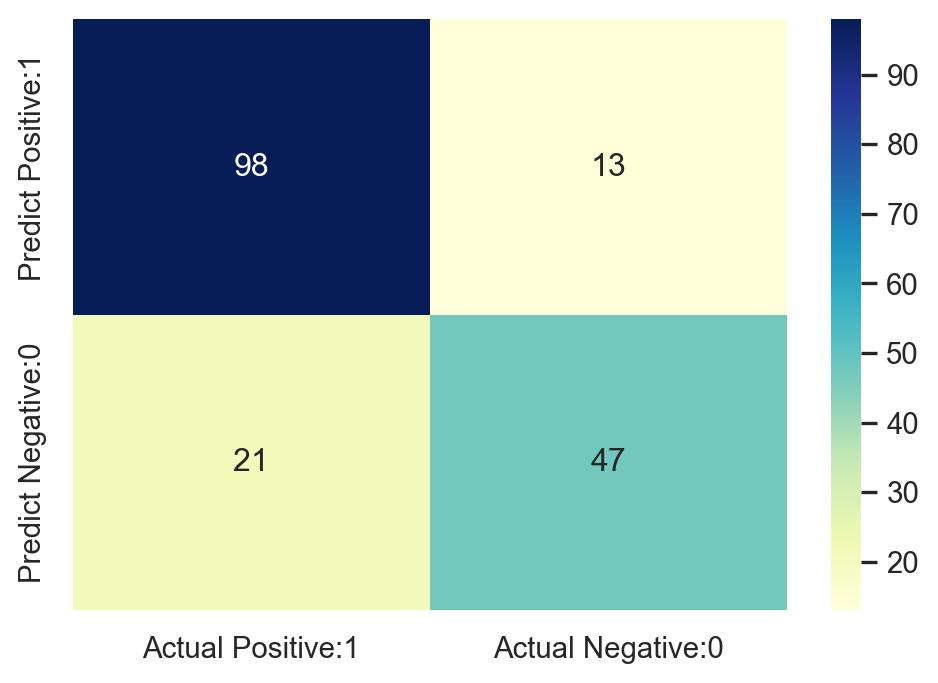
cm = confusion_matrix(y_test, y_pred)
print('Confusion matrix\n\n', cm)
print('\nTrue Positives(TP) = ', cm[0,0])
print('\nTrue Negatives(TN) = ', cm[1,1])
print('\nFalse Positives(FP) = ', cm[0,1])
print('\nFalse Negatives(FN) = ', cm[1,0])
Confusion matrix

 [[98 13]
 [21 47]]

True Positives(TP) =  98

True Negatives(TN) =  47

False Positives(FP) =  13

False Negatives(FN) =  21
# Visualizing Confusion Matrix
plt.figure(figsize=(6,4))
cm_matrix = pd.DataFrame(data= cm, columns=['Actual Positive:1', 'Actual Negative:0'], 
                                 index=['Predict Positive:1', 'Predict Negative:0'])

sns.heatmap(cm_matrix, annot=True, fmt='d', cmap='YlGnBu')
plt.show()

9.3 Classification Report

print (classification_report(y_test, y_pred))
              precision    recall  f1-score   support

           0       0.82      0.88      0.85       111
           1       0.78      0.69      0.73        68

    accuracy                           0.81       179
   macro avg       0.80      0.79      0.79       179
weighted avg       0.81      0.81      0.81       179

9.4 ROC-AUC Curve

idx = np.min(np.where(tpr > 0.95)) # index of the first threshold for which the sensibility (true positive rate (tpr)) > 0.95

plt.figure()
plt.plot(fpr, tpr, color='coral', label='ROC curve (area = %0.3f)' % auc(fpr, tpr))
plt.plot([0, 1], [0, 1], 'k--')
plt.plot([0,fpr[idx]], [tpr[idx],tpr[idx]], 'k--', color='blue')
plt.plot([fpr[idx],fpr[idx]], [0,tpr[idx]], 'k--', color='blue')
plt.xlim([0.0, 1.0])
plt.ylim([0.0, 1.05])
plt.xlabel('False Positive Rate (1 - specificity)', fontsize=14)
plt.ylabel('True Positive Rate (recall/sensitivity)', fontsize=14)
plt.title('Receiver operating characteristic (ROC) curve')
plt.legend(loc="lower right")
plt.show()

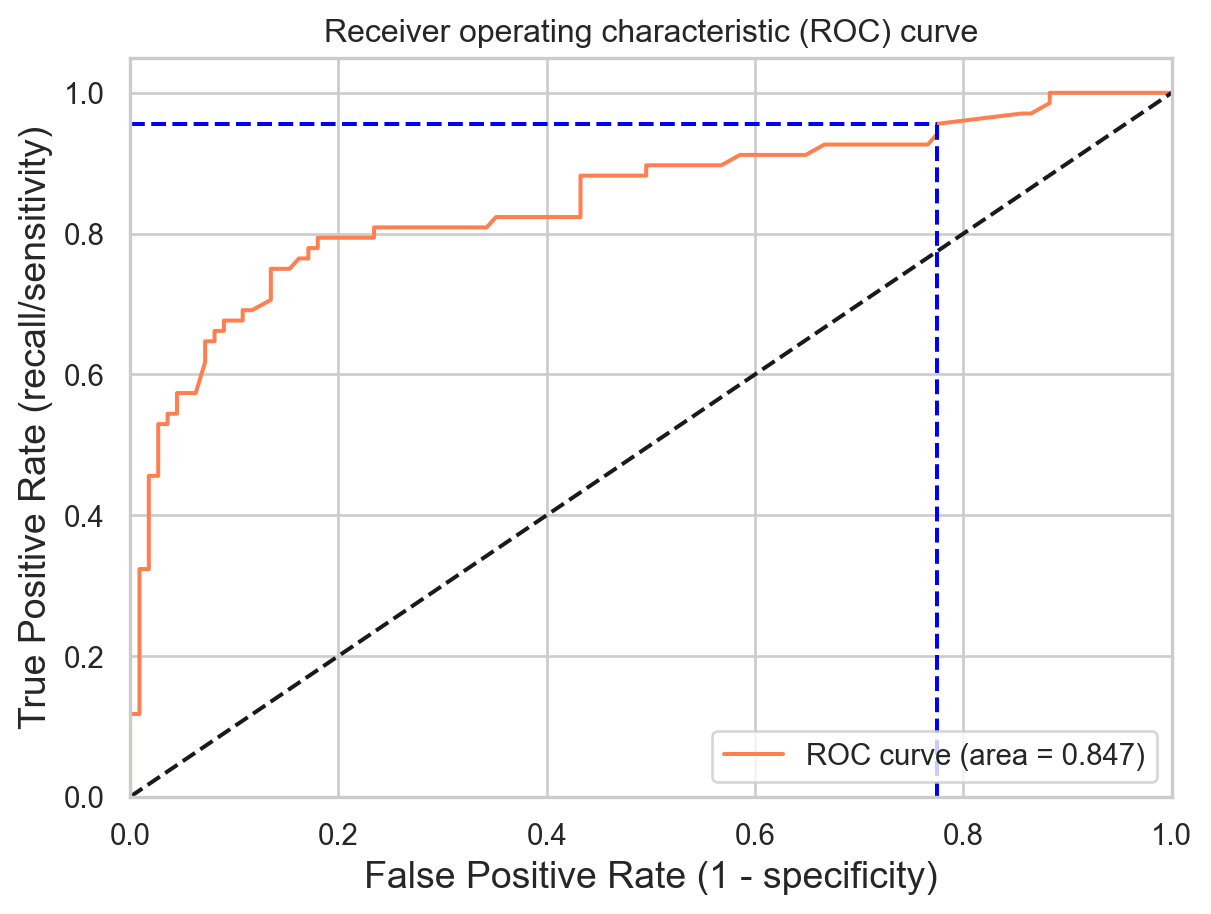
print("Using a threshold of %.3f " % thr[idx] + "guarantees a sensitivity of %.3f " % tpr[idx] +  
      "and a specificity of %.3f" % (1-fpr[idx]) + 
      ", i.e. a false positive rate of %.2f%%." % (np.array(fpr[idx])*100))

Using a threshold of 0.087 guarantees a sensitivity of 0.956 and a specificity of 0.225, i.e. a false positive rate of 77.48%.

10 Model Evaluation Based on K-fold Cross-validation cross_val_score() Function

# 10-fold cross-validation logistic regression
logreg = LogisticRegression(max_iter=5000)
# Use cross_val_score function
# We are passing the entirety of X and y, not X_train or y_train, it takes care of splitting the data
# cv=10 for 10 folds
# scoring = {'accuracy', 'neg_log_loss', 'roc_auc'} for evaluation metric - althought they are many
scores_accuracy = cross_val_score(logreg, X, y, cv=10, scoring='accuracy')
scores_log_loss = cross_val_score(logreg, X, y, cv=10, scoring='neg_log_loss')
scores_auc = cross_val_score(logreg, X, y, cv=10, scoring='roc_auc')
print('K-fold cross-validation results:')
print(logreg.__class__.__name__+" average accuracy is %2.3f" % scores_accuracy.mean())
print(logreg.__class__.__name__+" average log_loss is %2.3f" % -scores_log_loss.mean())
print(logreg.__class__.__name__+" average auc is %2.3f" % scores_auc.mean())
K-fold cross-validation results:
LogisticRegression average accuracy is 0.796
LogisticRegression average log_loss is 0.454
LogisticRegression average auc is 0.850

10.1 Model Evaluation Based on K-fold Cross-validation Using cross_validate() Function

scoring = {'accuracy': 'accuracy', 'log_loss': 'neg_log_loss', 'auc': 'roc_auc'}

modelCV = LogisticRegression(max_iter=5000)

results = cross_validate(modelCV, X, y, cv=10, scoring=list(scoring.values()), 
                         return_train_score=False)

print('K-fold cross-validation results:')
for sc in range(len(scoring)):
    print(modelCV.__class__.__name__+" average %s: %.3f (+/-%.3f)" % (list(scoring.keys())[sc], -results['test_%s' % list(scoring.values())[sc]].mean()
                               if list(scoring.values())[sc]=='neg_log_loss' 
                               else results['test_%s' % list(scoring.values())[sc]].mean(), 
                               results['test_%s' % list(scoring.values())[sc]].std())) 
K-fold cross-validation results:
LogisticRegression average accuracy: 0.796 (+/-0.024)
LogisticRegression average log_loss: 0.454 (+/-0.037)
LogisticRegression average auc: 0.850 (+/-0.028)

What happens when we add the feature Fare -

cols = ["Age","Fare","TravelAlone","Pclass_1","Pclass_2","Embarked_C","Embarked_S","Sex_male","IsMinor"]
X = final_train[cols]

scoring = {'accuracy': 'accuracy', 'log_loss': 'neg_log_loss', 'auc': 'roc_auc'}

modelCV = LogisticRegression(max_iter=5000)

results = cross_validate(modelCV, final_train[cols], y, cv=10, scoring=list(scoring.values()), 
                         return_train_score=False)

print('K-fold cross-validation results:')
for sc in range(len(scoring)):
    print(modelCV.__class__.__name__+" average %s: %.3f (+/-%.3f)" % (list(scoring.keys())[sc], -results['test_%s' % list(scoring.values())[sc]].mean()
                               if list(scoring.values())[sc]=='neg_log_loss' 
                               else results['test_%s' % list(scoring.values())[sc]].mean(), 
                               results['test_%s' % list(scoring.values())[sc]].std()))
K-fold cross-validation results:
LogisticRegression average accuracy: 0.795 (+/-0.027)
LogisticRegression average log_loss: 0.455 (+/-0.037)
LogisticRegression average auc: 0.849 (+/-0.028)

We notice that the model is slightly deteriorated. The Fare variable does not carry any useful information. Its presence is just a noise for the logistic regression model.

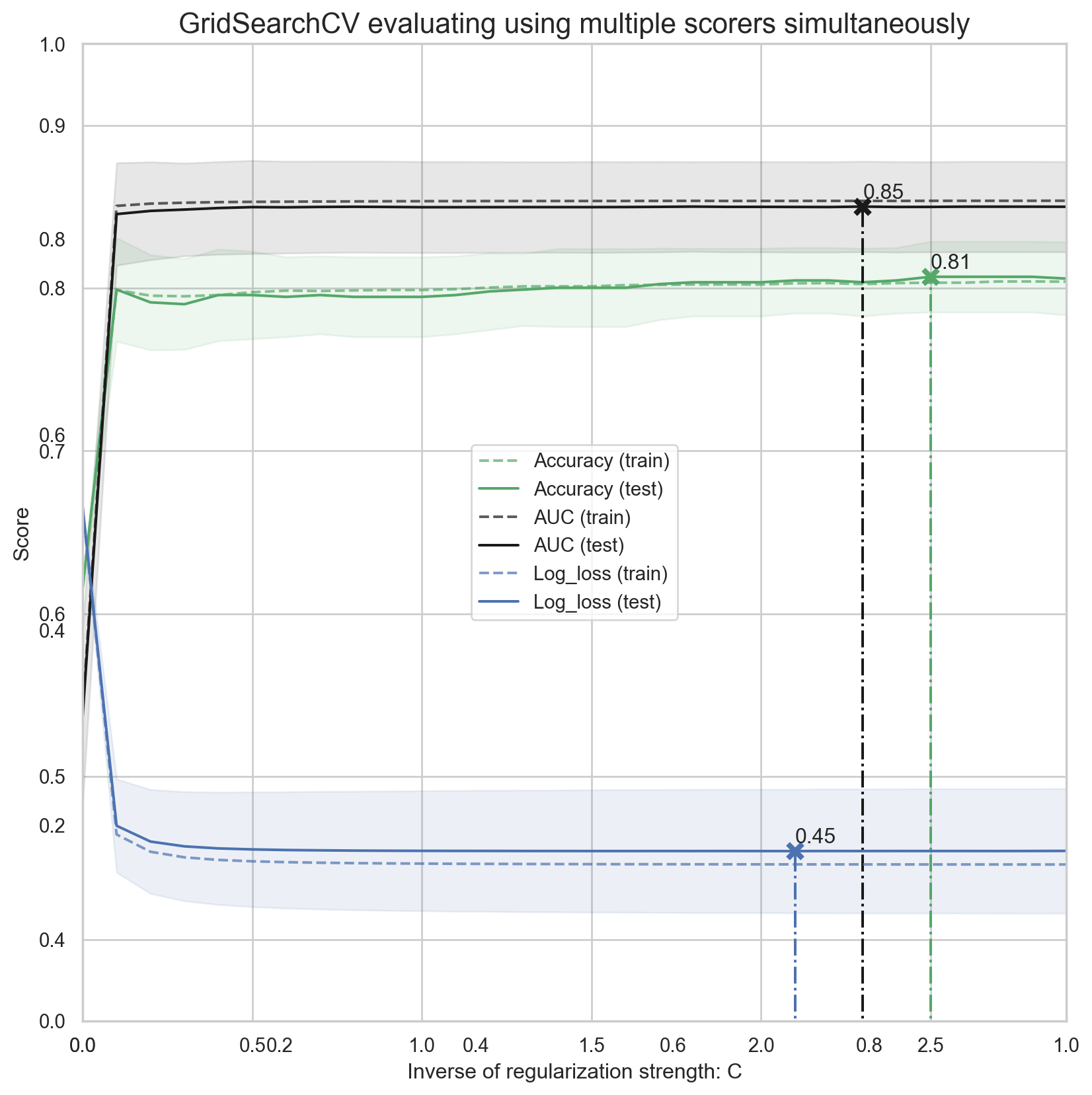
11 GridSearchCV Evaluating Using Multiple Scorers Simultaneously

from sklearn.model_selection import GridSearchCV

X = final_train[Selected_features]

param_grid = {'C': np.arange(1e-05, 3, 0.1)}
scoring = {'Accuracy': 'accuracy', 'AUC': 'roc_auc', 'Log_loss': 'neg_log_loss'}

gs = GridSearchCV(LogisticRegression(max_iter=5000), return_train_score=True,
                  param_grid=param_grid, scoring=scoring, cv=10, refit='Accuracy')

gs.fit(X, y)
results = gs.cv_results_

print('='*20)
print("best params: " + str(gs.best_estimator_))
print("best params: " + str(gs.best_params_))
print('best score:', gs.best_score_)
print('='*20)

plt.figure(figsize=(10, 10))
plt.title("GridSearchCV evaluating using multiple scorers simultaneously",fontsize=16)

plt.xlabel("Inverse of regularization strength: C")
plt.ylabel("Score")
plt.grid()

ax = plt.axes()
ax.set_xlim(0, param_grid['C'].max()) 
ax.set_ylim(0.35, 0.95)

# Get the regular numpy array from the MaskedArray
X_axis = np.array(results['param_C'].data, dtype=float)

for scorer, color in zip(list(scoring.keys()), ['g', 'k', 'b']): 
    for sample, style in (('train', '--'), ('test', '-')):
        sample_score_mean = -results['mean_%s_%s' % (sample, scorer)] if scoring[scorer]=='neg_log_loss' else results['mean_%s_%s' % (sample, scorer)]
        sample_score_std = results['std_%s_%s' % (sample, scorer)]
        ax.fill_between(X_axis, sample_score_mean - sample_score_std,
                        sample_score_mean + sample_score_std,
                        alpha=0.1 if sample == 'test' else 0, color=color)
        ax.plot(X_axis, sample_score_mean, style, color=color,
                alpha=1 if sample == 'test' else 0.7,
                label="%s (%s)" % (scorer, sample))

    best_index = np.nonzero(results['rank_test_%s' % scorer] == 1)[0][0]
    best_score = -results['mean_test_%s' % scorer][best_index] if scoring[scorer]=='neg_log_loss' else results['mean_test_%s' % scorer][best_index]
        
    # Plot a dotted vertical line at the best score for that scorer marked by x
    ax.plot([X_axis[best_index], ] * 2, [0, best_score],
            linestyle='-.', color=color, marker='x', markeredgewidth=3, ms=8)

    # Annotate the best score for that scorer
    ax.annotate("%0.2f" % best_score,
                (X_axis[best_index], best_score + 0.005))

plt.legend(loc="best")
plt.grid('off')
plt.show() 
====================
best params: LogisticRegression(C=np.float64(2.50001), max_iter=5000)
best params: {'C': np.float64(2.50001)}
best score: 0.8069662921348316
====================

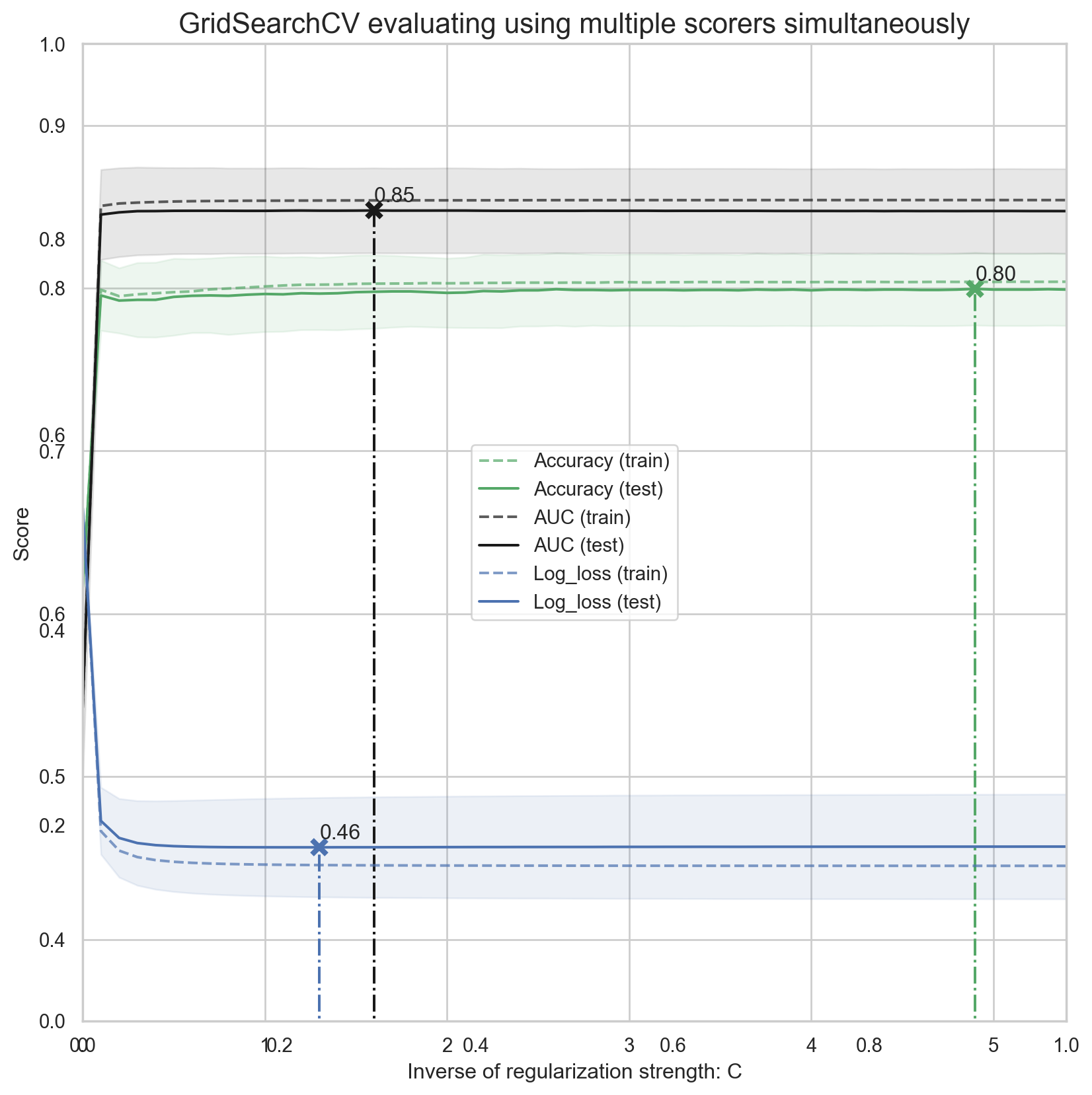
11.1 GridSearchCV Evaluating Using Multiple scorers, RepeatedStratifiedKFold and pipeline for Preprocessing Simultaneously

from sklearn.preprocessing import StandardScaler
from sklearn.model_selection import RepeatedStratifiedKFold
from sklearn.pipeline import Pipeline

#Define simple model
###############################################################################
C = np.arange(1e-05, 5.5, 0.1)
scoring = {'Accuracy': 'accuracy', 'AUC': 'roc_auc', 'Log_loss': 'neg_log_loss'}
log_reg = LogisticRegression(max_iter=5000)

#Simple pre-processing estimators
###############################################################################
std_scale = StandardScaler(with_mean=False, with_std=False)
#std_scale = StandardScaler()

#Defining the CV method: Using the Repeated Stratified K Fold
###############################################################################

n_folds=5
n_repeats=5

rskfold = RepeatedStratifiedKFold(n_splits=n_folds, n_repeats=n_repeats, random_state=2)

#Creating simple pipeline and defining the gridsearch
###############################################################################

log_clf_pipe = Pipeline(steps=[('scale',std_scale), ('clf',log_reg)])

log_clf = GridSearchCV(estimator=log_clf_pipe, cv=rskfold,
              scoring=scoring, return_train_score=True,
              param_grid=dict(clf__C=C), refit='Accuracy')

log_clf.fit(X, y)
results = log_clf.cv_results_

print('='*20)
print("best params: " + str(log_clf.best_estimator_))
print("best params: " + str(log_clf.best_params_))
print('best score:', log_clf.best_score_)
print('='*20)

plt.figure(figsize=(10, 10))
plt.title("GridSearchCV evaluating using multiple scorers simultaneously",fontsize=16)

plt.xlabel("Inverse of regularization strength: C")
plt.ylabel("Score")
plt.grid()

ax = plt.axes()
ax.set_xlim(0, C.max()) 
ax.set_ylim(0.35, 0.95)

# Get the regular numpy array from the MaskedArray
X_axis = np.array(results['param_clf__C'].data, dtype=float)

for scorer, color in zip(list(scoring.keys()), ['g', 'k', 'b']): 
    for sample, style in (('train', '--'), ('test', '-')):
        sample_score_mean = -results['mean_%s_%s' % (sample, scorer)] if scoring[scorer]=='neg_log_loss' else results['mean_%s_%s' % (sample, scorer)]
        sample_score_std = results['std_%s_%s' % (sample, scorer)]
        ax.fill_between(X_axis, sample_score_mean - sample_score_std,
                        sample_score_mean + sample_score_std,
                        alpha=0.1 if sample == 'test' else 0, color=color)
        ax.plot(X_axis, sample_score_mean, style, color=color,
                alpha=1 if sample == 'test' else 0.7,
                label="%s (%s)" % (scorer, sample))

    best_index = np.nonzero(results['rank_test_%s' % scorer] == 1)[0][0]
    best_score = -results['mean_test_%s' % scorer][best_index] if scoring[scorer]=='neg_log_loss' else results['mean_test_%s' % scorer][best_index]
        
    # Plot a dotted vertical line at the best score for that scorer marked by x
    ax.plot([X_axis[best_index], ] * 2, [0, best_score],
            linestyle='-.', color=color, marker='x', markeredgewidth=3, ms=8)

    # Annotate the best score for that scorer
    ax.annotate("%0.2f" % best_score,
                (X_axis[best_index], best_score + 0.005))

plt.legend(loc="best")
plt.grid('off')
plt.show() 
====================
best params: Pipeline(steps=[('scale', StandardScaler(with_mean=False, with_std=False)),
                ('clf',
                 LogisticRegression(C=np.float64(4.90001), max_iter=5000))])
best params: {'clf__C': np.float64(4.90001)}
best score: 0.7995505617977527
====================

12 Regularization

Regularization is a method of preventing overfitting, which is a common problem in machine learning. Overfitting means that your model learns too much from the specific data you have, and fails to generalize well to new or unseen data. This can lead to poor predictions and low performance. Regularization helps you avoid overfitting by adding a penalty term to the cost function of your model, which measures how well your model fits the data. The penalty term reduces the complexity of your model by shrinking or eliminating some of the coefficients of your input variables.

Since the size of each coefficient depends on the scale of its corresponding variable, scaling the data is required so that the regularization penalizes each variable equally. The regularization strength is determined by C and as C increases, the regularization term becomes smaller (and for extremely large C values, it’s as if there is no regularization at all).

If the initial model is overfit (as in, it fits the training data too well), then adding a strong regularization term (with small C value) makes the model perform worse for the training data, but introducing such “noise” improves the model’s performance on unseen (or test) data.

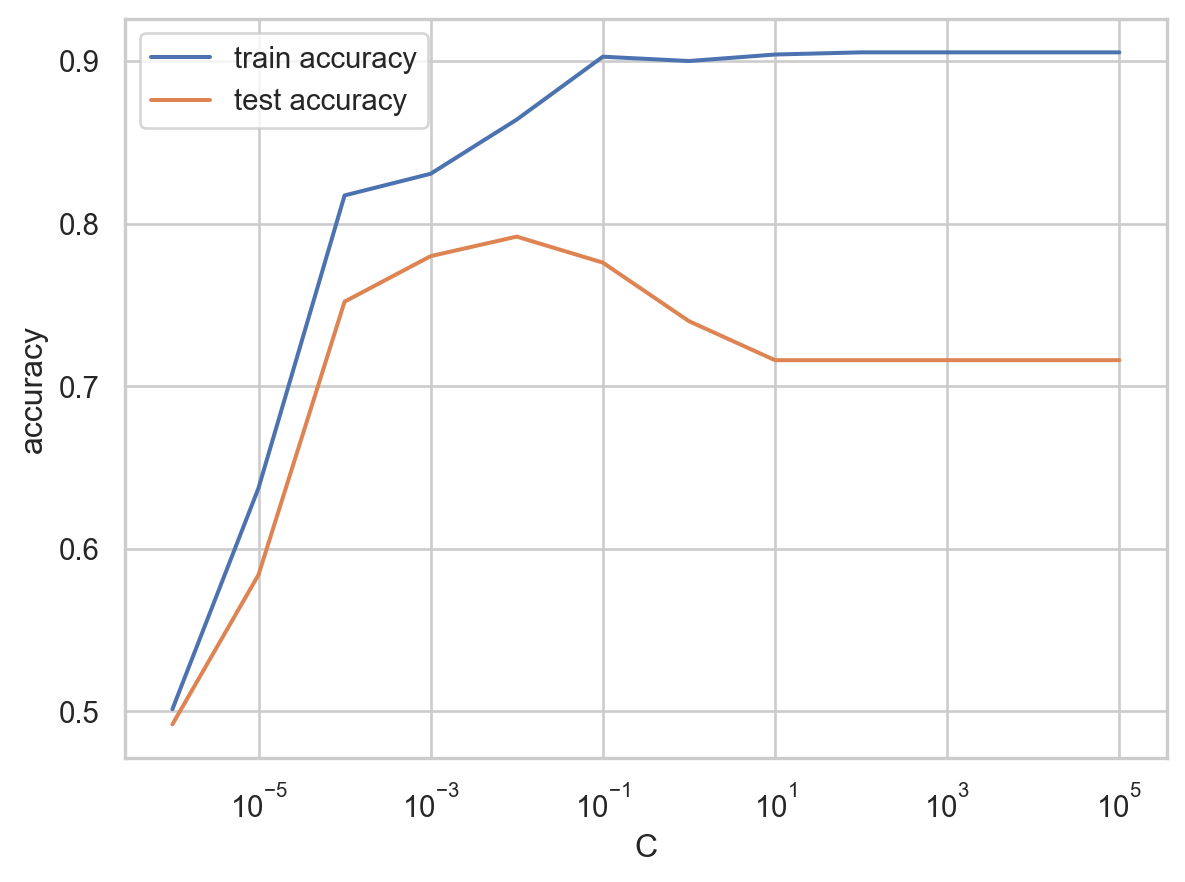
An example with 1000 samples and 200 features shown below. As can be seen from the plot of accuracy over different values of C, if C is large (with very little regularization), there is a big gap between how the model performs on training data and test data. However, as C decreases, the model performs worse on training data but performs better on test data (test accuracy increases). However, when C becomes too small (or the regularization becomes too strong), the model begins performing worse again because now the regularization term completely dominates the objective function.

# Necessary Python Packages 
import pandas as pd
from sklearn.datasets import make_classification
from sklearn.model_selection import train_test_split
from sklearn.preprocessing import StandardScaler
from sklearn.linear_model import LogisticRegression
# make sample data
X, y = make_classification(1000, 200, n_informative=195, random_state=2023)
# split into train-test datasets
X_train, X_test, y_train, y_test = train_test_split(X, y, random_state=2023)

# normalize the data
sc = StandardScaler()
X_train = sc.fit_transform(X_train)
X_test = sc.transform(X_test)

# train Logistic Regression models for different values of C
# and collect train and test accuracies
scores = {}
for C in (10**k for k in range(-6, 6)):
    lr = LogisticRegression(C=C)
    lr.fit(X_train, y_train)
    scores[C] = {'train accuracy': lr.score(X_train, y_train), 
                 'test accuracy': lr.score(X_test, y_test)}

# plot the accuracy scores for different values of C
pd.DataFrame.from_dict(scores, 'index').plot(logx=True, xlabel='C', ylabel='accuracy')

12.1 Types of Regularization

12.1.1 L1 regularization

L1 regularization, also known as Lasso regularization, adds the sum of the absolute values of the model’s coefficients to the loss function. It encourages sparsity in the model by shrinking some coefficients to precisely zero. This has the effect of performing feature selection, as the model can effectively ignore irrelevant or less important features. L1 regularization is particularly useful when dealing with high-dimensional datasets with desired feature selection.

Mathematically, the L1 regularization term can be written as:

L1 regularization = λ * Σ|wi|

Here, λ is the regularization parameter that controls the strength of regularization, wi represents the individual model coefficients and the sum is taken over all coefficients.

12.1.2 L2 regularization

L2 regularization, also known as Ridge regularization, adds the sum of the squared values of the model’s coefficients to the loss function. Unlike L1 regularization, L2 regularization does not force the coefficients to be exactly zero but instead encourages them to be small. L2 regularization can prevent overfitting by spreading the influence of a single feature across multiple features. It is advantageous when there are correlations between the input features.

Mathematically, the L2 regularization term can be written as:

L2 regularization = λ * Σ(wi^2)

Similar to L1 regularization, λ is the regularization parameter, and wi represents the model coefficients. The sum is taken over all coefficients, and the squares of the coefficients are summed.

The choice between L1 and L2 regularization depends on the specific problem and the characteristics of the data. For example, L1 regularization produces sparse models, which can be advantageous when feature selection is desired. L2 regularization, on the other hand, encourages small but non-zero coefficients and can be more suitable when there are strong correlations between features.

13 Conclusion

Back to top